
Hyperkin Trooper 2 Premium USB Game Controller
4.1Editor score
Compatible with macOS
Ergonomic design
Durable construction
This guide compares the top Mac game joysticks for flight sim, arcade, and retro gaming to help you choose the right controller for your setup.
Finding the right Mac game joystick can transform your gaming experience on macOS. Whether you enjoy flight simulators, arcade classics, or modern titles, a quality controller offers precision and comfort that standard keyboards cannot match.
We evaluated ten top-rated joysticks based on compatibility, build quality, and performance. Our analysis focuses on how well each device integrates with macOS, its ergonomic design, and its suitability for different gaming genres.
Each pick highlights unique features and potential trade-offs to help you decide. Note that pricing and availability fluctuate frequently so verify current details before purchasing to ensure you get the best value for your needs.
4.1Editor score
4.6Editor score

4.0Editor score
The following table offers a side by side view of all ten selected joysticks. It highlights key specifications and compatibility details to help you quickly identify the best fit for your specific gaming needs.


The Hyperkin Trooper 2 is a classic style controller designed for retro gaming and emulation on Mac. It features a sturdy build and ergonomic design that makes it comfortable for long sessions.
We may earn a commission when you buy through this link, at no additional cost to you.
Its quiet joystick and responsive buttons provide smooth inputs ideal for old school arcade games. The chamfered corners enhance grip and the quality materials ensure longevity during regular use.
While it lacks modern wireless features it delivers reliable performance for the price. Users appreciate the 10 foot cable and mappable buttons that add flexibility to various gaming setups.
This controller is perfect for budget conscious gamers who value durability and comfort. It offers a solid entry point into Mac game joysticks without compromising on essential functionality.
The design includes chamfered corners and grips that reduce hand fatigue during extended play.
High quality materials like plastic joysticks and soft rubber grommets ensure long life.
We may earn a commission when you buy through this link, at no additional cost to you.
The Thrustmaster T-Flight Stick X offers a plug and play setup for flight simulation enthusiasts. It is recognized immediately by systems making it easy to start flying without technical hurdles.
We may earn a commission when you buy through this link, at no additional cost to you.
Its adjustable resistance control allows users to fine tune stick tension for different flying styles. The weighted base ensures stability during intense maneuvers preventing unwanted movement on the desk.
Built in throttle and rudder twist features provide a complete control system in one device. This eliminates the need for separate pedals saving valuable space while maintaining professional functionality.
This joystick is ideal for those seeking reliability and ease of use. It delivers precise inputs for flight sims and offers a solid experience for casual combat flight scenarios.
Fine tune stick tension to match your flying style for gentle turns or sharp responsiveness.
Enjoy a complete flight control system with ergonomic integrated throttle and rudder twist.
We may earn a commission when you buy through this link, at no additional cost to you.
The abxylute C6 stands out with its Hall Effect joysticks that prevent drift and wear. It supports a 1000Hz polling rate ensuring precise and prompt responses for seamless gaming on Mac.
We may earn a commission when you buy through this link, at no additional cost to you.
Its wide compatibility covers PC Mac Switch and Tesla making it a versatile choice. The rechargeable battery delivers up to eighteen hours of continuous gameplay for uninterrupted sessions.
Vibration and turbo features add immersion and control customization. The controller is lightweight and designed to reduce wear and tear for competitive gaming scenarios.
This device is perfect for gamers who prioritize precision and durability. It offers a reliable wireless experience with modern features that enhance overall gaming performance.
Experience unparalleled precision and durability with no drifting or dead zones on controls.
The controller achieves 1000Hz polling rate ensuring minimal input lag for competitive edge.
We may earn a commission when you buy through this link, at no additional cost to you.
The MAYFLASH F300 is a versatile arcade stick compatible with multiple platforms including Mac. It features Sanwa Denshi buttons and joystick which are perfect for customization and durability.
We may earn a commission when you buy through this link, at no additional cost to you.
Supporting both XINPUT and DINPUT modes ensures it works seamlessly on PC systems. The turbo functions with different speed settings allow players to execute rapid moves effectively.
While it is an entry level model it offers robust performance for fighting games. Its design is simple yet effective for those entering the arcade gaming scene.
This stick is recommended for beginners seeking a reliable and affordable option. It provides the necessary tools to enjoy arcade classics without breaking the budget.
Compatible with Sanwa Denshi buttons and joystick that is perfect for customization.
Compatible with Switch PS4 Xbox macOS Windows and more for broad usability.
We may earn a commission when you buy through this link, at no additional cost to you.
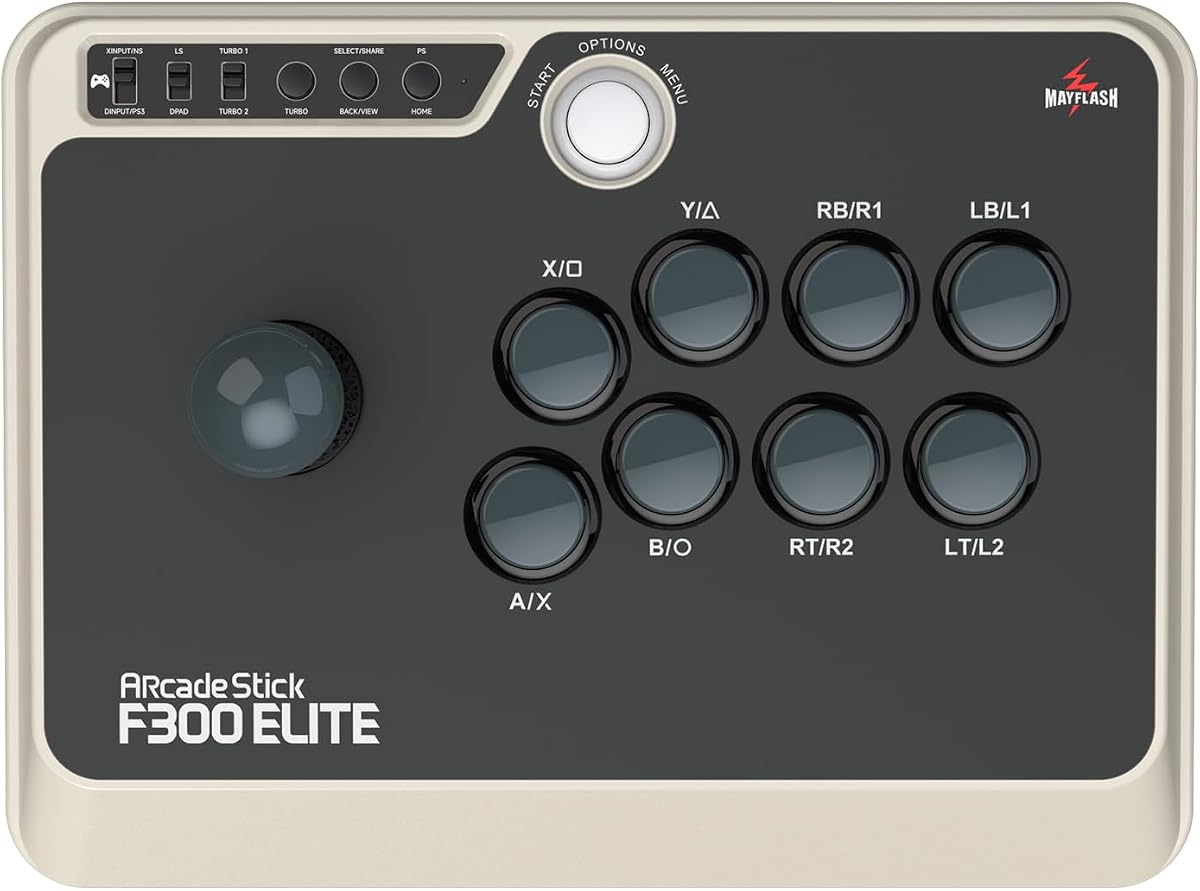
The MAYFLASH F300 Elite elevates the classic design with premium Sanwa components for superior response. It is built for modding enthusiasts allowing full customization of the platform and buttons.
We may earn a commission when you buy through this link, at no additional cost to you.
Its compatibility spans multiple consoles and systems ensuring flexibility across gaming setups. The XINPUT and DINPUT support guarantees smooth integration with PC environments.
Warranty and service support are robust giving buyers confidence in the product. It strikes a balance between performance and versatility for competitive arcade players.
This model is ideal for serious gamers who demand precision and reliability. It offers the best value for those willing to invest in a high performance arcade stick.
Using premium quality Sanwa components ensures you can reliably strike instantly and surely.
The F300 Elite was built for modding enthusiasts with accessible inside platform.
We may earn a commission when you buy through this link, at no additional cost to you.
The Thrustmaster SimTask FarmStick is designed specifically for farming simulator gameplay. It offers a 3 axis joystick for precise control when operating heavy machinery in sims.
We may earn a commission when you buy through this link, at no additional cost to you.
With up to thirty three programmable inputs users can manage every function without a keyboard. The Hall Effect magnetic sensors ensure ultra accurate performance over long periods of use.
Its ambidextrous design allows flexible setups with racing wheels or dual joysticks. While it targets farming sims it provides a unique experience for simulation enthusiasts.
This controller is recommended for dedicated simulation players seeking realism. It delivers a specialized interface that enhances immersion in construction and farming environments.
Experience precise smooth control when operating tractors loaders and construction equipment.
H.E.A.R.T technology eliminates drift and wear ensuring long-term precision and control.
We may earn a commission when you buy through this link, at no additional cost to you.
The 8Bitdo Ultimate 2 features TMR joysticks that offer higher sensitivity and precision. It uses exclusive wireless technology delivering a stable connection with ultra low latency for competitive gaming.
We may earn a commission when you buy through this link, at no additional cost to you.
Its trigger mode switch allows users to choose between linear and tactile triggers. The controller includes extra bumpers and a multifunctional charging dock for enhanced control.
With support for PC and and Android it fits many gaming ecosystems. The customizable motion control and turbo functions add versatility to various game genres.
This controller is perfect for gamers who value technology and ergonomics. It offers a premium wireless experience that suits both casual and competitive play styles.
Offering higher sensitivity greater precision and enhanced durability over standard sensors.
8BitDo Exclusive Wireless Technology delivers exceptionally stable 2.4G connection.
We may earn a commission when you buy through this link, at no additional cost to you.
The Moonag Wireless PC Controller features Hall Effect joysticks to prevent drift and wear. It supports a 1000Hz polling rate providing ultra low latency for fast paced gaming on Mac.
We may earn a commission when you buy through this link, at no additional cost to you.
Its ergonomic design and textured grip reduce fatigue during extended sessions. The dynamic RGB lighting around buttons and sticks creates an immersive gaming atmosphere.
Turbo functions and dual vibration feedback enhance gameplay for action and racing titles. The battery life is supported by a rechargeable system allowing play while charging.
This device is ideal for gamers seeking style and performance together. It combines modern tech with comfortable design for a polished gaming experience.
Equipped with hall effect sensor joysticks that prevent stick drift and wear.
Features dynamic RGB lighting to create an immersive gaming atmosphere.
We may earn a commission when you buy through this link, at no additional cost to you.
The Logitech G X56 offers military grade precision for space and flight simulation. It includes customizable options and a 4 spring system for adjusting stick force.
We may earn a commission when you buy through this link, at no additional cost to you.
With over 189 programmable controls it provides complete command over complex flight scenarios. RGB backlighting allows users to match lighting to their gaming rig environment.
Mini analog sticks control pitch roll and yaw for accurate navigation. It is ideal for VR setups where controls must be intuitive and well placed.
This setup is perfect for professional sim enthusiasts who demand realism. It delivers top tier performance for those investing in a serious flight cockpit.
Military-grade Space and Flight Sim Precision with all control surface options.
Accurate 16-bit aileron and elevator axis with hall-effect sensors and throttle.
We may earn a commission when you buy through this link, at no additional cost to you.
The SPEEDLINK Competition PRO brings back a classic arcade design for retro gaming. It is a digital USB joystick perfect for playing original games from the past.
We may earn a commission when you buy through this link, at no additional cost to you.
The anniversary edition includes a collection of twenty retro games for download making it a complete package for fans. Its nostalgic design replicates the feel of arcade machines.
This controller works well with PCs and Android devices for simple gameplay. It focuses on simplicity and style rather than modern complex features.
It is best suited for enthusiasts who love retro gaming and collectibles. The stick delivers a genuine arcade experience that stands out in any gaming room.
Nostalgic Design Taken from the Original Competition Pro Arcade Machine Stick.
Anniversary Edition Includes Games Collection with 20 Retro Games for Download.
We may earn a commission when you buy through this link, at no additional cost to you.
Choosing the right Mac game joystick requires understanding your needs. This guide breaks down key factors to ensure you get a controller that performs well with your system.
Ensure the joystick is officially supported on macOS. Many devices list Windows compatibility but may lack drivers for Mac. Look for products that specify Mac or universal support to avoid connection issues.
Always verify macOS compatibility before purchase to guarantee seamless integration with your gaming setup.
Decide between wired and wireless options. Wired USB connections offer zero latency and reliability for competitive games. Wireless controllers provide freedom of movement but require battery management.
Select the connectivity type that aligns with your gaming habits and desk setup preferences.
Look for durable materials like high grade plastic or metal components. A weighted base prevents sliding during intense use and ergonomic shapes reduce hand fatigue over time.
Prioritize build quality to ensure the controller lasts through long gaming sessions and years of use.
Consider features like Hall Effect sensors for precision or programmable buttons for macros. Flight sticks need adjustable resistance while arcade sticks benefit from customizable button layouts.
Choose specialized features that enhance performance in your preferred gaming genres.
Check if the manufacturer provides mapping software for Mac. This allows you to customize button layouts and save profiles for different games. Good support ensures flexibility and easier setup.
Confirm software support exists to fully utilize the joystick's customization capabilities.
Budget controls can be effective for casual gaming but premium models offer better precision. Balance cost against the features you need to avoid overspending on unnecessary extras.
Set a budget that reflects your gaming needs and expected usage frequency.
An ergonomic design reduces strain during extended play. Consider the grip texture and overall shape. It should fit your hand naturally to prevent discomfort.
Focus on ergonomics to maintain comfort and avoid fatigue during long gaming hours.
A solid warranty indicates confidence in the product quality. Look for companies that offer responsive customer service for troubleshooting technical issues with Mac integration.
Verify warranty terms to protect your investment against defects or malfunctions.
Connect your joystick to your Mac via USB or Bluetooth. If using wireless, ensure the dongle or Bluetooth mode is active. Navigate to System Settings to verify the device is recognized and ready for input.
Download any necessary configuration software from the manufacturer. Use it to map buttons and adjust settings like sensitivity. Save your profiles to ensure quick switching between different games.
Keep the joystick clean by wiping it with a dry cloth. Avoid liquids near the ports and store it in a cool dry place when not in use to maintain longevity and performance.
Not all flight joysticks work on Mac as many are Windows only. Always check the product description for macOS compatibility. If unsure, contact the manufacturer to confirm Mac support before buying.
Yes many modern joysticks support arcade mode. Look for products that explicitly mention arcade compatibility or offer customizable layouts. Some dedicated arcade sticks work natively with Mac emulation software.
A Hall Effect joystick uses magnets instead of physical contact for movement. This prevents wear and drift ensuring precise control over time. It is a preferred technology for modern gaming controllers.
Most manufacturers provide Mac compatible software for button mapping. Install the software, connect the joystick, and assign functions to each button. Save profiles to switch setups quickly.
Modern wireless joysticks are reliable with low latency. Look for models with 2.4GHz dongles or Bluetooth 5.0+. They avoid lag issues found in older wireless models and suit competitive play.
Many joysticks work plug and play without drivers. However complex models may require specific software for full functionality. Check the system requirements to see if drivers are needed.
We have explored ten distinct joysticks suitable for Mac users ranging from arcade sticks to flight sims. Each option brings unique strengths to support different gaming styles and preferences.
Prioritize compatibility and build quality to ensure long term satisfaction. Consider the specific genres you play to select features that enhance your experience effectively.
Prices and availability change often so always check the current listings before buying. This guide aims to provide a solid foundation for finding the right controller for your setup.