
Nettbe 60 PCS Reusable Cable Ties
4.8Editor score
Reusable hook loop design
Sixty pieces included
Adjustable cord straps
A clean gaming setup starts with proper cable management for gaming PC that keeps wires hidden and organized. Messy cords can ruin your aesthetic and create safety hazards in your gaming room.
We evaluated ten highly rated products based on durability, ease of installation, and capacity to handle various cable types. Our analysis covers sleeves, trays, clips, and ties for comprehensive solutions.
Each pick highlights specific strengths like budget value or heavy duty support for your rig. Note that availability and pricing change frequently so verify current details before purchasing.
4.8Editor score
4.6Editor score
4.6Editor score
As an Amazon Associate we earn from qualifying purchases.
This side-by-side comparison reviews ten top rated solutions ranging from simple ties to full under desk trays. Each product offers unique features to suit different gaming desk layouts and cable volumes.




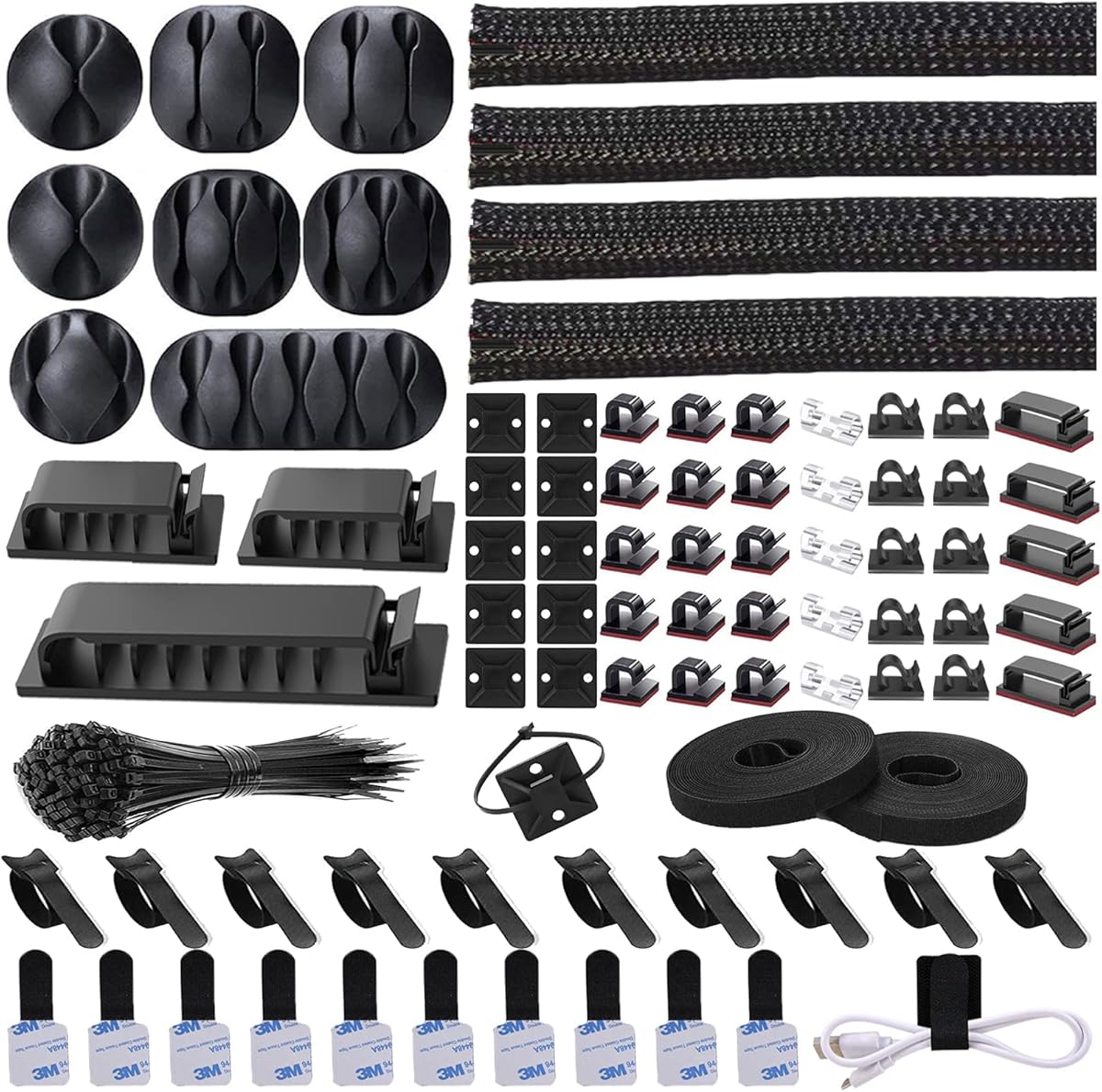
This complete kit offers 192 pieces designed to tackle every cable challenge in a gaming setup. It holds a strong 4.6 star rating from users who appreciate the variety of included components.
We may earn a commission when you buy through this link, at no additional cost to you.
The four wire organizer sleeves allow easy loading without disconnecting power. Strong self adhesive pads ensure clips stay put on desks or walls without slipping over time.
While the sheer volume of ties might seem like too much for small setups, it ensures you have spares for future upgrades. The clips work on clean surfaces like wood or ceramics effectively.
Gamers seeking an all-in-one solution should consider this kit for its versatility and value. It simplifies organizing power cords and peripheral wires quickly without needing separate purchases.
Includes sleeves, ties, and clips to handle different cable thicknesses and routing needs across your gaming desk.
Strong sticky pads keep cable holders affixed firmly to your desired surface preventing loose wires from tangling.
We may earn a commission when you buy through this link, at no additional cost to you.
This organizer kit mirrors the comprehensive nature of top picks with 192 pieces for full coverage. Users value the safety materials and ease of use without drilling or nailing required.
We may earn a commission when you buy through this link, at no additional cost to you.
The split wire loom design lets you load existing cables effortlessly. Once closed it provides a perfect wire wrap that protects cords from pet damage or wear.
While adhesive performance depends on surface cleanliness, the provided pads offer robust bonding for most smooth desks. The nylon ties add flexibility for bundling heavy groups of cables.
Ideal for gaming rooms needing extensive organization this kit covers all bases. It keeps your workspace clutter free and safe for years with its sturdy components.
No tools needed as the split design and adhesive pads simplify setup for immediate cable management benefits.
Nontoxic and sturdy components ensure safe handling and long term use without degrading over time.
We may earn a commission when you buy through this link, at no additional cost to you.
This protector focuses on simple yet effective cable wrapping for standard thickness cords. With a 4.7 rating it stands out for its reliability in preventing pet damage.
We may earn a commission when you buy through this link, at no additional cost to you.
The split design makes loading existing USB or HDMI cables straightforward without disconnection. It operates across a wide temperature range suitable for various environments.
While it lacks adhesive clips for mounting the sleeve itself secures cables neatly. Users looking for a dedicated solution against cat chewing will find this highly effective.
Recommended for gamers needing a specific sleeve for power or audio cables. It offers quality protection at an affordable price point compared to larger kits.
Insulated sleeve effectively prevents cats from chewing on exposed wires keeping your home safe.
Easy to load wires without removing existing connections simplifying setup for busy gamers.
We may earn a commission when you buy through this link, at no additional cost to you.
These J channels offer robust raceway organization for power and peripheral wires along desk edges. The design allows flexible layouts with an outward opening for easy access.
We may earn a commission when you buy through this link, at no additional cost to you.
Installation uses pre-applied adhesive tape on smooth surfaces without tools. With 24 hours set time the bond becomes robust enough to support multiple cables securely.
While powder coated walls may hinder adhesion the heat removal option preserves furniture finish. The flame-retardant PVC adds a critical safety layer for your setup.
Gamers with heavy desk cables will appreciate the 10 cable capacity per channel. It keeps your workspace professional and tidy with durable construction.
Outward-facing opening design allows effortless placement and removal of cables as your setup changes.
Flame-retardant material prevents ignition providing an extra layer of safety for your electronics.
We may earn a commission when you buy through this link, at no additional cost to you.
These hook loop straps offer a simple reusable solution for bundling loose cords. With a 4.8 rating users love the adjustability and quantity included in the pack.
We may earn a commission when you buy through this link, at no additional cost to you.
They work well in homes, offices, or garages for quick adjustments. The premium nylon adhesive materials ensure they can be used multiple times without wear.
While they do not provide rigid protection like sleeves they excel at keeping groups together. The ease of removal makes them ideal for frequent setup changes.
Gamers on a budget should consider these for basic bundling needs. They reduce clutter effectively without the need for expensive hardware or tools.
Premium materials allow multiple uses saving money compared to single-use ties.
Loop design adapts to different cable thicknesses for secure wrapping.
We may earn a commission when you buy through this link, at no additional cost to you.
This tray uses strong adhesive to hold cables without screws making it ideal for renters. Users report improved desk aesthetics by reducing visible clutter significantly.
We may earn a commission when you buy through this link, at no additional cost to you.
The spacious design accommodates multiple cables and even transformers. Adhesive backing praised for strength ensures the tray stays secure without bending or slipping.
While some may prefer screw fixing the adhesive is robust for smooth surfaces. It handles various equipment efficiently without occupying too much space.
Gamers wanting a clean look without drilling should choose this option. It simplifies cable routing under the desk for a neater appearance.
Strong adhesive backing allows quick setup without drilling tools or additional hardware.
Fits multiple cables and power strips to keep under desk areas organized.
We may earn a commission when you buy through this link, at no additional cost to you.
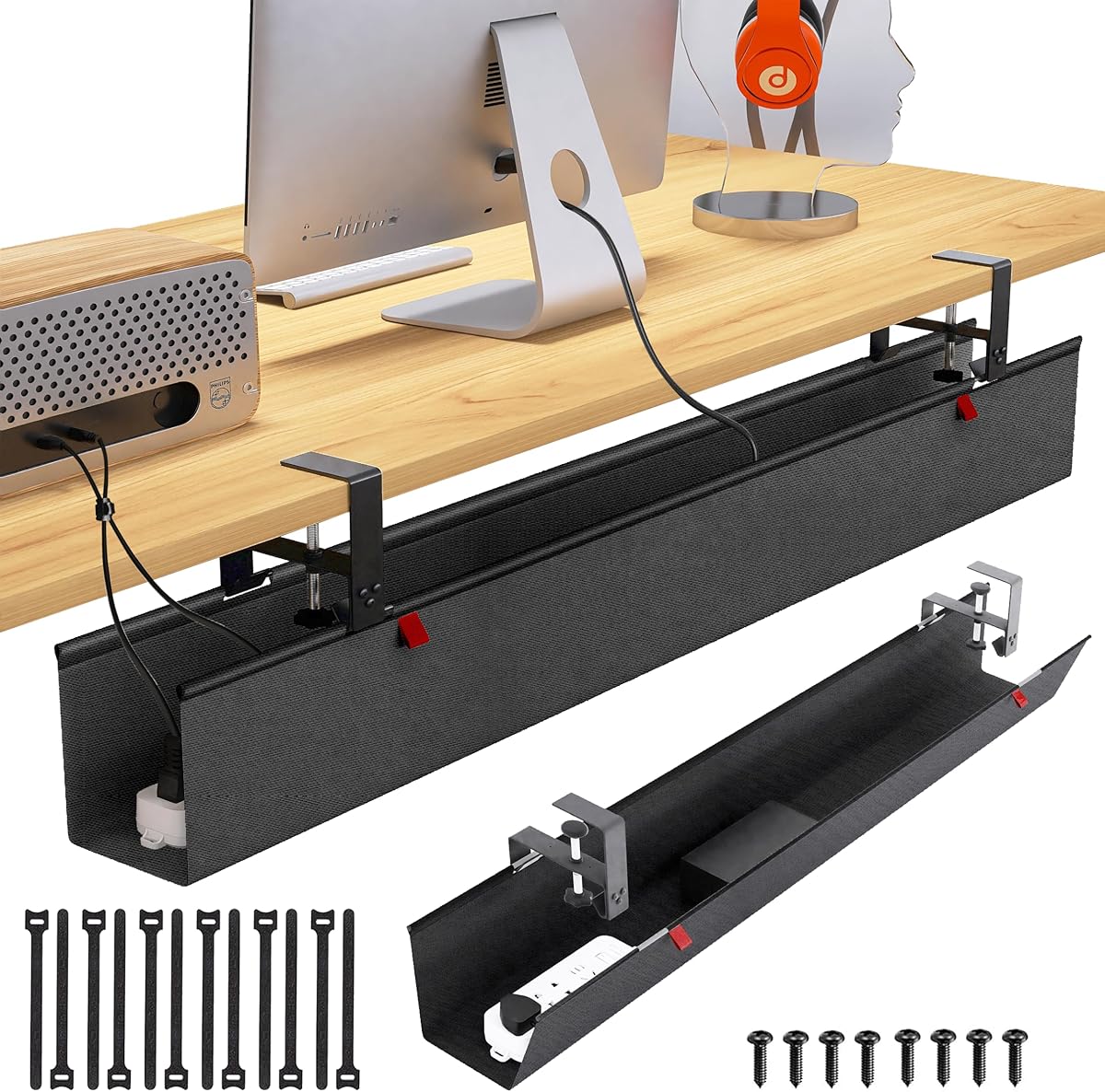
This tray offers large capacity with a heavy duty clamp suitable for demanding setups. Users can choose between clamp or screw fixing based on their table material.
We may earn a commission when you buy through this link, at no additional cost to you.
The 36 inch length accommodates big adapters and sockets under the table. The unfolded design makes adding or removing items much easier for maintenance.
While clips might be visible from certain angles the strength is reliable. The 600D oxford fabric adds durability and flame retardant features.
Gamers with heavy equipment should consider this for its capacity and strength. It effectively hides everything under your desk while keeping it elegant.
Supports both clamp and screw fixes to fit different table materials securely.
36 inch size fits large adapters and sockets easily for comprehensive hiding.
We may earn a commission when you buy through this link, at no additional cost to you.
This metal tray provides robust support for cables and power bricks without heat buildup. The mesh structure ensures good ventilation to prevent overheating effectively.
We may earn a commission when you buy through this link, at no additional cost to you.
Installation uses a simple clamp mechanism on smooth desk edges. Adjustable positioning allows you to move it easily as your setup changes.
While assembly takes about three minutes the non-slip pads protect the desk surface. It holds up to 15 pounds which handles most gaming gear.
Gamers prioritizing durability and airflow should choose this metal option. It keeps cables tidy and safe while preventing dust accumulation.
Mesh structure maintains airflow to prevent overheating of power supplies.
Solid metal build supports heavy gaming equipment without sagging.
We may earn a commission when you buy through this link, at no additional cost to you.
These clips offer a flexible solution using elastic loops instead of rigid plastic. The silicone loop provides lasting strength and flexibility for various cable sizes.
We may earn a commission when you buy through this link, at no additional cost to you.
Mount options include adhesive pads screws or zip ties for versatility. Users appreciate the one-handed operation for easy addition or removal of cables.
While elastic loops may eventually wear they are reusable to reduce waste. The square base ensures a firm grip on most surfaces reliably.
Gamers needing flexible routing points should consider these clips. They provide a reliable way to organize wires without permanent damage to surfaces.
Includes adhesive screws and zip ties to attach clips to various surfaces.
Hook design allows easy operation with one hand for quick adjustments.
We may earn a commission when you buy through this link, at no additional cost to you.
This premium tray provides total blackout concealment for a clean under desk aesthetic. Built for heavy duty support it prevents sagging even with large power bricks.
We may earn a commission when you buy through this link, at no additional cost to you.
The black Oxford fabric blocks the view of wires while allowing breathability. It keeps power connections clean and safe from pets or dust accumulation.
While the price is higher the stealth factor is ideal for gaming setups. The side-opening design helps route thick cables easily without full disassembly.
Gamers seeking a complete stealth solution should choose this premium tray. It enhances your battlestation look by hiding every wire effectively.
High-density black fabric blocks view of wires for a clean professional look.
Anti-sag base supports heavy gear like console adapters without bowing.
We may earn a commission when you buy through this link, at no additional cost to you.
Selecting the right solution requires considering your desk layout cable volume and aesthetic goals.
Choose materials like nylon, PVC, or metal that resist wear over time. Avoid cheap plastics that might break under heavy cables.
Decide between adhesive, screw, or clamp options based on your desk material. Adhesive works on smooth surfaces but screws offer more stability.
Estimate the total number of cables you need to hide. Select trays or sleeves that accommodate power strips and multiple HDMI or USB cables easily.
Match your gear's color scheme. Black trays blend well into dark setups while silver adds a metallic contrast to modern gaming rooms.
Reusable ties and clips allow changes as you upgrade gear. Rigid sleeves may require removal if you add new components to your desk.
Look for flame-retardant materials to prevent fire hazards. Proper management keeps wires off floors to reduce tripping risks in gaming areas.
Basic kits are affordable but trays cost more. Determine if you need full coverage or just simple bundling for your specific setup.
Start by unplugging all power sources before organizing wires to ensure safety. Route cables from your PC through the sleeves or tray systematically.
Secure each cable with ties or clips at regular intervals to prevent sagging. Check that no cables are stretched too tightly as this causes damage.
Clean dust from trays and sleeves periodically to maintain airflow. Avoid using harsh chemicals on adhesive pads to keep them sticky and effective.
Yes, it improves airflow to prevent overheating and reduces tripping hazards. A tidy setup also enhances the visual appeal of your gaming room significantly.
Most designs fit standard desks or gaming tables. Ensure you measure the space available before installing trays or clips.
Adhesive pads are removable but leave residue if left too long. Using a hairdryer to warm the tape helps remove them cleanly without damage.
Measure the diameter of your thickest cable. Half inch sleeves work for standard power cords while larger ones fit thick bundles or adapter heads.
Use wall raceways or sleeves to route wires discreetly behind the TV frame. Choose clips that match your wall color to keep the look clean.
Yes, heavy duty trays support power strips and adapters easily. Look for reinforced anti-sag bases to ensure stability for long-term use.
The top picks provide solutions for every setup. The NOROCME kit offers versatility while the under desk trays handle heavy loads effectively.
Prioritize durability and ease of installation to ensure long term satisfaction. Reusable options are better for those who upgrade their gear frequently.
Verify current availability and prices as these details may change. Take time to measure your space before purchasing for the best results.