
TRENDnet TEG-S50284
4.8Editor score
24x 2.5G RJ45 ports
4x 10G SFP+ uplinks
Lifetime manufacturer protection
This guide compares the top 25GbE switches with SFP28 ports for enterprise data centers, AI clusters, and high-performance networking needs.
High-performance networking demands powerful infrastructure capable of handling massive data throughput efficiently. The 25GbE switches with SFP28 ports offer the ideal balance between speed and cost for modern data centers. These devices enable seamless connectivity for servers, storage systems, and networking equipment requiring fast reliable links.
We evaluated ten leading models based on port configuration, switching capacity, and feature sets relevant to professional environments. Our analysis covers managed and unmanaged options from reputable brands like Cisco, QNAP, and Ubiquiti. Each product was selected for its ability to support demanding workloads including virtualization and AI clustering.
Every recommendation highlights specific strengths such as power efficiency, manageability, or raw throughput capabilities. While ratings and availability vary, these switches represent current market leaders for 25 gigabit Ethernet deployments. Please note that pricing and stock levels change frequently so verify details before purchasing your network gear.
4.8Editor score

5.0Editor score

4.6Editor score
The following table provides a side-by-side comparison of all ten selected switches highlighting their core specifications and key capabilities for quick reference.





This Cisco Nexus switch represents the pinnacle of 25GbE switching technology offering unmatched connectivity for large data centers. With a perfect rating it delivers maximum flexibility through 48 fixed 10/25-Gbps SFP+ ports and 6 fixed 100-Gbps QSFP28 ports. The cut-through architecture ensures latency below one microsecond ideal for big data processing and high-performance computing tasks.
We may earn a commission when you buy through this link, at no additional cost to you.
Key strengths include VXLAN support enabling efficient network virtualization for scalable and highly available networks. Cisco ACI integration simplifies automation making deployment and management of virtual and physical networks easier than ever. The modular design allows easy upgrades while hot-swappable power supplies ensure your network stays up 24/7 without interruptions.
Trade-offs involve higher costs compared to entry-level models and a steeper learning curve for NX-OS administration. However these challenges are acceptable given the enterprise-grade reliability and performance capabilities. Organizations requiring top-tier throughput will find these limitations minor relative to the operational benefits gained.
Large enterprises and cloud service providers should choose this switch for critical workloads demanding consistent performance. It remains the ultimate choice for large-scale data center deployments where network stability and high bandwidth are non-negotiable priorities for business continuity.
The combination of 25GbE access ports and 100GbE uplinks provides flexible bandwidth allocation for modern workloads.
VXLAN support enables scalable network segmentation crucial for multi-tenant cloud environments.
We may earn a commission when you buy through this link, at no additional cost to you.
The QNAP QSW-M7230 is purpose-built for AI clustering workloads and large-scale NAS deployments requiring ultra-fast connectivity. It delivers non-blocking throughput with 4 x 25GbE SFP28 and 24 x 10GbE RJ45 ports alongside 2 x 100GbE QSFP28 uplinks. This configuration supports high-bandwidth enterprise environments needing reliable low-latency connections.
We may earn a commission when you buy through this link, at no additional cost to you.
Advanced lossless technologies including Priority Flow Control and Explicit Congestion Notification minimize packet loss significantly. These features make the switch ideal for optimizing RoCEv2 high-speed data transmission in storage networks and virtualization clusters. The robust web GUI supports IPv4/IPv6 static routing VLAN QoS and bandwidth control for efficient segmentation.
While specific customer ratings are limited the build quality reflects professional data center standards suitable for intensive use. The design prioritizes scalability allowing seamless bridging between modern 100G/25G backbones and existing 10G copper setups. This ensures cost-effective migration strategies for growing businesses needing flexible multi-gigabit integration.
AI infrastructure architects and NAS administrators should select this switch for its specialized feature set. It provides the necessary foundation for high-performance storage area networks and high-res media production workflows demanding consistent bandwidth.
Built-in PFC and ECN technologies ensure minimal packet loss during heavy data transfers.
Future-proof architecture supports smooth migration from 10G to 25G and 100G standards.
We may earn a commission when you buy through this link, at no additional cost to you.
The TRENDnet TEG-S50284 offers a cost-effective solution for businesses needing multi-gigabit speeds without high costs. Equipped with 24 high-speed 2.5G RJ-45 ports it provides speeds up to 2.5Gbps over existing Cat5e or better cabling. Four ultra-fast 10G SFP+ ports enable high-speed network connections for cost-effective uplinks.
We may earn a commission when you buy through this link, at no additional cost to you.
Reliability is emphasized through Lifetime Manufacturer Protection and NDAA TAA compliance for government customers. Smart fans auto-adjust speed to save energy while maintaining cooling efficiency. The 1U 19-inch rack mountable metal housing includes a mounting kit for easy physical integration into standard server racks.
Although it lacks dedicated 25GbE ports the 2.5G and 10G combination covers many SMB needs effectively. VLAN passthrough support ensures flexible network segmentation. This switch balances affordability with essential features making it suitable for small to medium enterprises expanding their bandwidth needs.
Small businesses and government contractors should consider this switch for compliant reliable networking solutions. It meets strict regulatory standards while providing essential multi-gigabit speeds for current infrastructure demands.
Leverages existing cabling for 2.5G speeds reducing immediate infrastructure upgrade costs.
NDAA TAA compliance ensures suitability for public sector procurement requirements.
We may earn a commission when you buy through this link, at no additional cost to you.
This renewed Cisco Nexus switch offers enterprise-grade performance at a reduced cost compared to new units. It features 48 fixed 25GbE SFP28 ports and 6 QSFP+/QSFP28 ports for high-bandwidth connectivity. The renewed status means the product has been professionally inspected tested and cleaned by Amazon qualified vendors.
We may earn a commission when you buy through this link, at no additional cost to you.
Despite being pre-owned the core functionality remains intact with dual AC power for redundancy. Accessories may not be original but are compatible and fully functional. The generic box packaging does not impact the internal hardware quality or network switching capabilities.
Trade-offs include potential variations in included accessories and the inherent uncertainty of used hardware. However professional inspection ensures reliability close to new units. This option suits organizations needing 25GbE capacity on a tighter budget without sacrificing essential features.
IT managers seeking proven enterprise hardware should consider this renewed model for its balance of performance and cost. It provides access to Cisco reliability without the premium price tag of brand-new equipment.
Vendor inspection ensures functionality meets operational standards despite pre-owned status.
Dual AC power inputs maintain uptime during power failures or maintenance.
We may earn a commission when you buy through this link, at no additional cost to you.
The Mikrotik CRS520 is an ultra-fast enterprise switch delivering exceptional processing power through a powerful quad-core ARM CPU running at 2 GHz. With 28 Gigabit SFP28 ports and 100 Gigabit QSFP28 ports it supports high-performance data paths for critical network needs. The 4 GB DDR4 RAM ensures smooth operation under heavy loads.
We may earn a commission when you buy through this link, at no additional cost to you.
This model stands out for its raw throughput capabilities allowing flexible routing and virtualization tasks. Extra processing power due to the CCR series CPU enables advanced features beyond basic switching. It is designed for environments needing high-speed connectivity without sacrificing manageability or performance control.
While the feature set is extensive configuration can be complex for new users. The premium price point reflects the hardware quality and performance capabilities. These trade-offs are acceptable for organizations prioritizing raw speed and processing power over simplicity.
Advanced network engineers and large enterprises should choose this switch for demanding routing and switching applications. It delivers the processing headroom needed for complex network virtualization and high-bandwidth traffic management.
The quad-core ARM CPU handles complex routing protocols and virtualization seamlessly.
28 SFP28 ports provide dense 25GbE connectivity with minimal uplink bottlenecks.
We may earn a commission when you buy through this link, at no additional cost to you.
The UniFi Aggregation Switch Pro is a fully managed Layer 3 switch designed to enhance network switching capacity with 28 10G SFP+ ports and 4 25G SFP28 ports. It features a 1.3 LCM color touchscreen for concise display of key system insights. Monitoring and configuration are possible via the intuitive UniFi Network web application and mobile app.
We may earn a commission when you buy through this link, at no additional cost to you.
With 760 Gbps switching capacity and non-blocking throughput of 380 Gbps it supports high-bandwidth aggregation links effectively. The design offers enhanced power supply failure protection when connected to the SmartPower Redundant Power System. Mechanical dimensions and weight support standard rack mounting in professional server environments.
Trade-offs include limitations on mixed speed on SFP28 ports where configuring one at 25Gbps limits others to 25Gbps. This constraint must be considered for mixed device environments. Despite this the unified management and high throughput remain significant advantages for UniFi users.
Ubiquiti ecosystem users should choose this switch for seamless integration and centralized management. It provides high-bandwidth aggregation links essential for growing networks needing efficient performance scaling.
Intuitive UniFi app and touchscreen provide real-time insights into network health and traffic.
760 Gbps switching capacity ensures non-blocking performance during peak usage.
We may earn a commission when you buy through this link, at no additional cost to you.
The Dell EMC PowerSwitch N3224P-ON provides robust PoE++ support for devices requiring higher power budgets. It includes 4 x 25 Gigabit SFP28 ports and 2 x 100 Gigabit QSFP28 for high-speed uplinks. The 21 total ports offer balanced connectivity for enterprise environments needing Layer 3 management capabilities.
We may earn a commission when you buy through this link, at no additional cost to you.
Modular design allows easy upgrades and maintenance ensuring long-term flexibility. The 1U rack-mountable form factor fits standard server cabinets efficiently. Power consumption reaches 944 W supporting PoE needs but requiring adequate cooling and power infrastructure.
High power consumption is a consideration for facilities managing energy efficiency carefully. However the PoE++ feature supports modern devices like high-speed cameras and access points. The enterprise support network ensures reliability for critical deployments.
Organizations requiring advanced power delivery should select this switch for its balanced feature set. It suits environments needing both high-speed fiber and PoE++ connectivity within a single managed device.
PoE++ support enables powering high-demand devices over standard cabling.
Modular hardware ensures easy upgrades to keep pace with network demands.
We may earn a commission when you buy through this link, at no additional cost to you.
This TRENDnet Web Smart Switch offers easy-to-use GUI management for reduced configuration complexity. It features 24 high-speed 2.5G RJ-45 ports and 4 ultra-fast 10G SFP+ ports for high-speed network connections. The cloud service allows remote management and diagnosis via TRENDnet's platform for flexible IT administration.
We may earn a commission when you buy through this link, at no additional cost to you.
Advanced managed features include access control lists VLAN IGMP snooping QoS RMON and SNMP trap for monitoring. This combination provides SMB management features for easy deployment in small to medium enterprises. Lifetime protection and NDAA TAA compliance ensure reliability and regulatory adherence for government projects.
User ratings indicate potential issues with advanced configuration or specific use cases. However the cost-effective 10G SFP+ uplinks provide necessary bandwidth for growth. The trade-offs balance simplicity with essential network management capabilities.
SMBs requiring reliable remote management should consider this switch for its straightforward interface. It delivers essential multi-gigabit speeds without complex enterprise configuration overhead.
Remote management via cloud service simplifies oversight for distributed teams.
RMON and SNMP trap features ensure detailed network performance insights.
We may earn a commission when you buy through this link, at no additional cost to you.
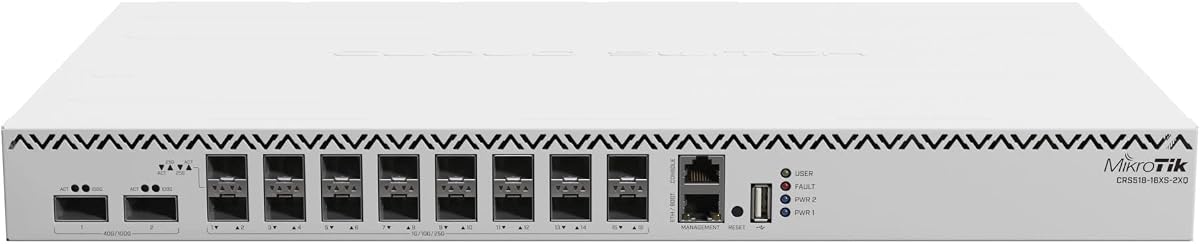
The MikroTik CRS518 is a compact Cloud Router Switch designed for high-speed networking with 16 SFP+ ports and 2 QSFP28 uplinks. The 650MHz CPU and 64MB RAM provide basic routing and switching capabilities for smaller environments. Its design targets efficient physical deployment in limited rack spaces.
We may earn a commission when you buy through this link, at no additional cost to you.
This switch offers high-speed uplinks crucial for connecting to core networks or data centers. The cloud routing features simplify management for distributed deployments. Cost effectiveness remains a strong selling point compared to enterprise alternatives from larger vendors.
Lower RAM and CPU speed limit complex routing protocols or high traffic loads. Organizations requiring simple connectivity without heavy virtualization will find it adequate. The trade-offs are acceptable for budget-conscious deployments needing physical layer performance.
Network administrators needing compact high-speed switches should choose this model for its efficient design. It balances performance with space-saving form factors for smaller server rooms.
QSFP28 uplinks provide essential 100G connectivity to core infrastructure.
Designed for efficiency to reduce physical space requirements in racks.
We may earn a commission when you buy through this link, at no additional cost to you.
The D-Link DGS-1210-28 features a fanless design ensuring silent operation and energy efficiency. It provides 24 Gigabit Ethernet ports for high-speed networking and 4 SFP combo ports for fiber uplinks. Layer 2+ features include QoS VLAN support and static routing to optimize performance and minimize congestion.
We may earn a commission when you buy through this link, at no additional cost to you.
Surveillance mode with ONVIF support streamlines IP surveillance deployment by optimizing video traffic. The NDAA compliant status makes it suitable for government and high-security projects. Lifetime warranty provides long-term confidence in quality and reliability for business users.
Limitations include Gigabit speed instead of 25GbE which may not suit high-throughput needs. However the energy-efficient design and quiet operation benefit office environments. This makes it ideal for deployments where noise and power consumption matter more than raw bandwidth.
Small offices and government projects should choose this switch for quiet compliant networking. It offers essential manageability without the heat and noise of high-performance models.
Fanless operation reduces power consumption while ensuring silent operation in offices.
NDAA compliance meets strict regulatory standards for secure government networks.
We may earn a commission when you buy through this link, at no additional cost to you.
Selecting the right 25GbE switch requires evaluating specific technical factors to ensure optimal performance for your use case.
Evaluate the number of 25GbE SFP28 ports required for your servers and storage systems. Ensure the switch offers sufficient uplink capacity such as 100GbE QSFP28 to prevent bottlenecks. High port density reduces the need for multiple devices which simplifies network topology and cabling costs.
Always match your current device needs with future growth plans to avoid rapid hardware replacement.
Switching capacity determines how much data the device can process simultaneously without congestion. Look for models with non-blocking throughput to ensure all ports can operate at full speed concurrently. High performance is critical for AI clustering and large NAS deployments needing consistent speed.
Verify the forwarding rate in packets per second to confirm it supports your expected traffic load.
Decide between Layer 2 Layer 3 or managed options based on your need for routing and VLANs. Enterprise switches often include advanced features like VXLAN ACI or cloud management for remote oversight. Proper management tools help administrators monitor traffic flows and detect issues quickly.
Prioritize switches with robust web GUI or CLI interfaces that fit your team's technical expertise.
High-performance switches generate significant heat requiring adequate cooling systems and power supplies. Check the wattage rating to ensure your facility can support the device without overloading circuits. Fanless designs may offer silent operation but could struggle with high thermal loads in dense racks.
Energy efficiency standards such as IEEE 802.3az can help reduce operational costs in long-term deployments.
If running virtual machines or containers ensure the switch supports VLANs and VXLANs for proper segmentation. Isolation of traffic segments improves security and performance in multi-tenant environments. Look for features like QoS to prioritize critical data like storage traffic or video feeds.
Virtualization-ready switches provide better control over network resources in modern computing scenarios.
Government and secure projects often require NDAA or TAA compliance for procurement eligibility. Verify that the selected model meets these regulatory standards to avoid legal or operational hurdles. Lifetime warranties offer peace of mind for long-term infrastructure investments.
Always check vendor support responsiveness and warranty terms before purchasing critical hardware.
Choose switches that support migration paths from existing 10G setups to 25G or 100G standards. Flexible multi-gigabit integration allows incremental upgrades without replacing the entire network. Future-proof devices ensure your investment remains relevant as bandwidth demands increase over time.
Scalable designs prevent premature obsolescence and support smooth hardware transitions for your business.
Balance initial hardware costs with maintenance energy consumption and potential upgrade expenses. While budget models offer savings they may lack the performance needed for intensive workloads. Calculate long-term costs including power and potential downtime to determine true value.
Prioritize switches that offer the best reliability-to-cost ratio for your specific operational needs.
Install the switch in a well-ventilated rack space ensuring adequate airflow for cooling. Connect SFP28 modules using compatible fiber or DAC cables for optimal signal integrity. Secure all connections firmly to prevent signal drops caused by loose physical links.
Access the management interface via web browser or CLI to configure VLANs and QoS settings. Assign static IP addresses to critical ports to ensure reliable access for network monitoring. Use built-in tools to monitor traffic and adjust settings as needed for performance.
Schedule regular firmware updates to address security vulnerabilities and improve compatibility. Keep the physical environment clean to prevent dust accumulation inside the unit. Periodically check power supplies and fans to ensure continuous uptime for your network.
These switches provide ultra-fast connectivity essential for modern data centers and high-performance computing tasks. They enable efficient data transfer rates that significantly reduce latency compared to 10G options. This makes them ideal for AI workloads large NAS deployments and virtualized storage environments needing reliable speed.
SFP28 ports support 25Gbps speeds typically used for direct server connections. QSFP28 ports support 100Gbps speeds generally reserved for uplinks or backbone connections. Choosing the right combination ensures adequate bandwidth for both access and aggregation layers.
While designed for enterprise needs some models offer cost-effective options for growing SMBs. Organizations with high data throughput needs can benefit from the scalability these switches provide. It is important to match the switch capabilities with current and projected traffic demands.
SFP28 ports require compatible fiber optic cables or direct attach copper cables for full speed operation. Using substandard cabling can result in speed limitations or connection instability. Always verify cable specifications match the switch port requirements before installation.
Many models include remote management features via cloud services or secure web interfaces. This capability allows administrators to configure and monitor the network from any location. Centralized management simplifies oversight especially for distributed IT infrastructures.
Look for vendors offering comprehensive warranties and responsive technical support teams. Enterprise-grade switches often come with better service level agreements compared to consumer models. Proper support ensures rapid resolution of issues minimizing downtime for critical operations.
The 25GbE switches with SFP28 ports reviewed here offer diverse solutions for various networking needs. From Cisco's high-performance enterprise options to TRENDnet's budget-friendly alternatives each model has distinct advantages. Selecting the right switch depends on balancing speed cost and specific feature requirements.
Prioritize switches that align with your current infrastructure while allowing for future expansion. Consider factors like power consumption management tools and compliance status when making your final decision. A well-chosen switch ensures reliable high-speed connectivity for years of demanding operations.
Remember to verify current availability and pricing before purchasing to ensure you get the best value. Network hardware costs fluctuate and models may change so checking current listings helps secure the right deal. Investing in quality infrastructure now saves money and headaches in the long run.