
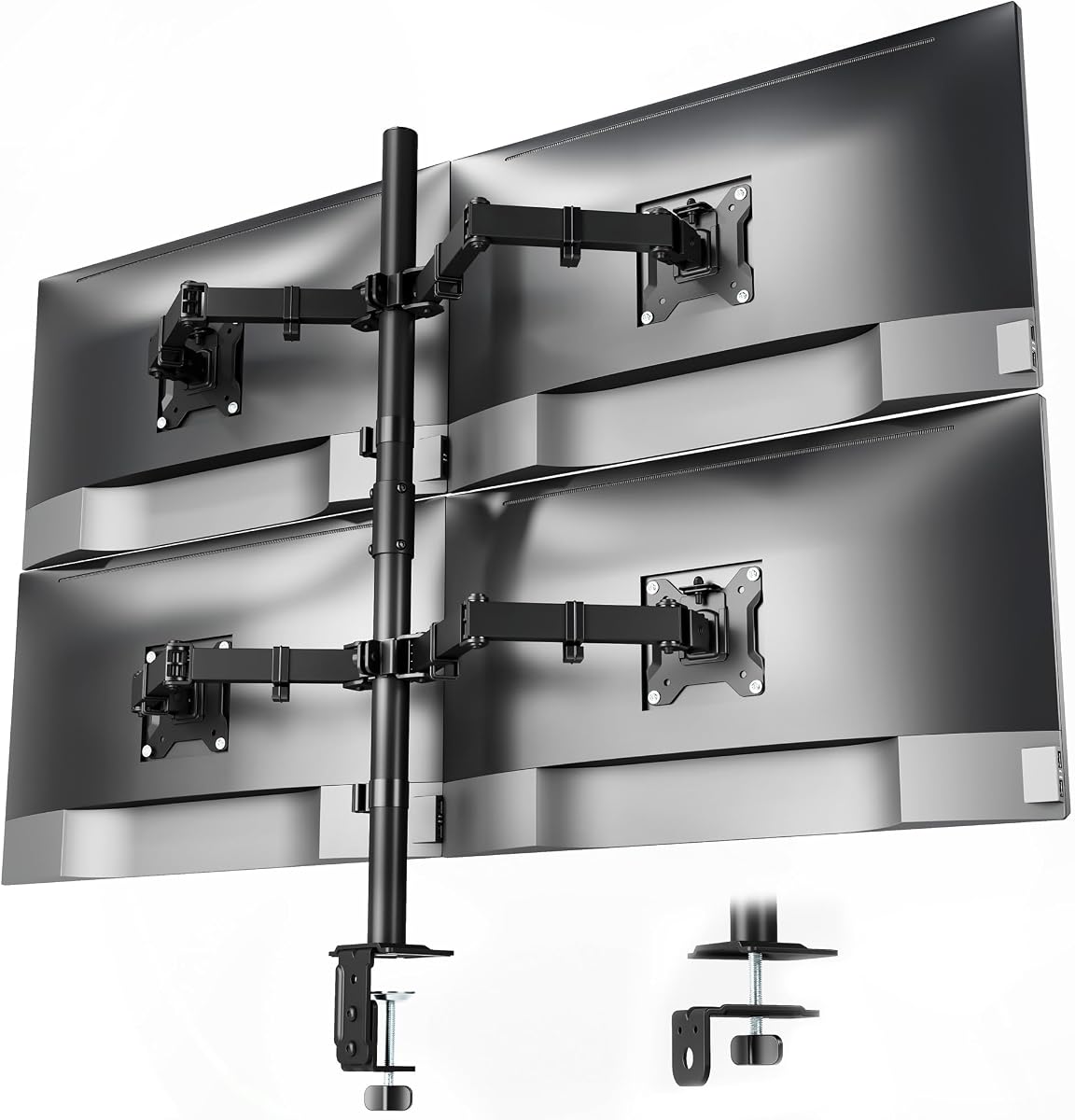
MOUNT PRO 4 Monitor Mount
4.5Editor score
Fits screens up to 32 inches
Height adjustment up to 31.7 inches
Compatible with VESA 75x75mm
Finding a reliable 4 monitor mount with adjustable arms is essential for professionals who need multiple screens for productivity. These mounts help organize your workspace, reduce clutter, and improve ergonomic posture by lifting displays off the desk surface.
We evaluated ten top-rated quad monitor stands based on their build quality, weight capacity, range of motion, and ease of installation. Our analysis focuses on how well each model supports different screen sizes and maintains stability during adjustments.
Each pick in this list highlights specific strengths like pneumatic adjustment, heavy-duty construction, or budget-friendly pricing. Please note that product availability and pricing can change frequently, so verify details before making your final purchase decision.
4.5Editor score

4.5Editor score

4.5Editor score
As an Amazon Associate we earn from qualifying purchases.
This comparison table summarizes the key specifications and features of the ten leading 4 monitor mounts available today to help you quickly identify the model that fits your specific desk and screen requirements.



The WALI Stacked 4 Monitor Mount stands out as the top choice for users seeking a versatile quad stand for screens up to 27 inches. With a solid 4.5 star rating and robust build quality, it offers excellent value and ergonomic benefits for multitasking professionals.
We may earn a commission when you buy through this link, at no additional cost to you.
This mount supports up to 22 lbs per arm, making it ideal for standard office displays. The fully adjustable arms allow tilting, swiveling, and rotation to achieve the perfect viewing angle. The steel frame ensures stability, while integrated cable management keeps wires organized.
While it excels with 27 inch screens, users with ultra-wide displays might find it limiting. Assembly is straightforward but requires attention to detail for cable routing. These trade-offs are minor given the price point and performance it delivers for standard setups.
This monitor is best for office workers, programmers, and traders needing a reliable quad setup on a budget. It transforms a cluttered desk into a professional workstation while reducing neck strain through improved screen positioning.
The mount allows you to adjust screens to eye level reducing physical strain during long work sessions and enabling seamless transitions between tasks like coding or gaming.
Elevating four monitors off the desk surface frees up valuable workspace for peripherals and documents keeping the environment clutter-free and efficient.
We may earn a commission when you buy through this link, at no additional cost to you.
The VIVO Pneumatic Arm Quad Mount is engineered for users with large ultra-wide displays needing premium support and effortless adjustment. Its heavy-duty construction and pneumatic technology provide a high-end experience unmatched by standard spring-based mounts.
We may earn a commission when you buy through this link, at no additional cost to you.
This mount accommodates one 49 inch ultra-wide screen or four 38 inch screens with a weight capacity of up to 44 lbs per arm. The pneumatic arms counterbalance monitor weight allowing height changes with a simple touch. The cast aluminum frame ensures durability and scratch resistance.
The cost is higher than average but justified by the advanced features and robust build. The clamp requires a sturdy surface and installation can be more involved due to the larger structure. These factors are acceptable for users prioritizing ultra-wide monitor support.
Ideal for advanced workstation setups and video editing professionals this mount delivers stability and ease of use. It transforms heavy ultra-wide screens into manageable displays offering a premium solution for demanding environments.
Powerful pneumatic arms counterbalance monitor weight so you can find the ideal screen height at the touch of a hand without struggling with tension knobs.
Designed specifically to fit 49 inch ultra-wide screens or multiple 38 inch displays this mount handles the extra width and weight with superior stability.
We may earn a commission when you buy through this link, at no additional cost to you.
The MOUNT PRO 4 Monitor Mount delivers essential quad mounting functionality at an entry-level price making it accessible for students and home office users. Its vertical design saves significant desk space and supports screens up to 32 inches comfortably.
We may earn a commission when you buy through this link, at no additional cost to you.
Each arm supports up to 17.6 lbs and offers full tilt and swivel adjustments for flexible positioning. The extra tall pole reaches up to 31.7 inches allowing standing or sitting configurations. It includes both C-clamp and grommet options for versatile desk installation.
While the weight capacity is lower than premium options it remains suitable for most standard monitors. The assembly process is straightforward with labeled parts but lacks detailed guidance. These minor limitations are acceptable given the significant cost savings and functional performance.
This mount is perfect for budget-conscious buyers wanting a neat workspace. It helps organize multiple screens efficiently without breaking the bank making it a smart choice for basic multi-monitor needs.
Offering a complete quad mounting solution at a very affordable price this stand provides essential features without unnecessary extras or high costs.
The vertical stack layout minimizes footprint on the desk surface freeing up room for keyboards and other accessories in smaller work areas.
We may earn a commission when you buy through this link, at no additional cost to you.
The PUTORSEN Quad Monitor Mount offers a unique hybrid configuration supporting one large ultra-wide monitor on top and three standard monitors below. This design is ideal for traders or content creators needing a wide primary screen with supporting displays.
We may earn a commission when you buy through this link, at no additional cost to you.
The top arm holds up to 44 lbs supporting heavy ultra-wide displays while lower arms support up to 15.4 lbs each. The 3-section arm design distributes weight evenly preventing sagging. Gas springs ensure smooth adjustments and the VESA plates are detachable for easy mounting.
The specialized design limits flexibility for uniform setups and comes at a higher price point than standard quad mounts. Installation requires careful planning for the different screen weights. These trade-offs are acceptable for users with specific multi-size display requirements.
This model is recommended for professionals using mixed monitor sizes like finance traders or video editors. It provides the stability and flexibility needed for complex multi-screen arrangements.
Supporting one large ultra-wide screen above three standard displays this mount accommodates complex setups that require different viewing priorities.
The 3-section arm design and robust construction prevent sagging ensuring that heavy top monitors stay level during long work sessions.
We may earn a commission when you buy through this link, at no additional cost to you.
The monTEK Quad Monitor Stand combines high weight capacity with a stable joint design ensuring reliable performance for standard office monitors. Each arm supports up to 22 lbs making it suitable for larger 32 inch displays without sagging concerns.
We may earn a commission when you buy through this link, at no additional cost to you.
Engineered for stability the mount uses high-grade materials and advanced joints to keep displays secure. Quick-release VESA plates simplify monitor attachment while integrated cable organizers maintain a tidy workspace. Installation is straightforward with options for C-clamp or grommet mounting.
The tilt range is narrower than some competitors which may limit certain ergonomic configurations. The base is somewhat bulky and may protrude from the desk edge. These minor constraints are outweighed by the robust build quality and ease of use.
This monitor is ideal for office environments needing reliable support for mixed monitor sizes. Its stability and ease of use make it a practical choice for daily professional tasks.
Built with high-grade materials and advanced joint design this mount ensures secure placement and level positioning without risk of sagging.
Quick-release VESA plates and clear instructions allow setup to be completed quickly typically within twenty minutes from unboxing.
We may earn a commission when you buy through this link, at no additional cost to you.
The MOUNTUP Quad Monitor Stand provides a balanced combination of price and performance suitable for most multi-monitor home office setups. With full adjustability and a sturdy base it offers reliable support for screens up to 32 inches.
We may earn a commission when you buy through this link, at no additional cost to you.
Each arm supports up to 17.6 lbs and allows 360 degree rotation and 180 degree swivel for flexible positioning. The cable clips keep wires organized and the VESA plates are detachable for easier installation. A clear instruction set ensures quick assembly.
Assembly might be easier with two people due to the weight of the structure. The grommet hole size is fixed which may not fit all desk types. These issues are minor compared to the overall value and features provided by this model.
This mount is a strong choice for home office workers seeking a reliable quad solution. Its balanced features and support make it a safe pick for most users.
Monitors can be rotated and tilted freely allowing you to adjust screen orientation and position for optimal comfort and focus.
MOUNTUP provides three years of customer support ensuring that any questions or issues after purchase are addressed promptly.
We may earn a commission when you buy through this link, at no additional cost to you.
The VIVO Quad Pneumatic Mount offers smooth pneumatic adjustment at a reasonable price making it a cost-effective alternative to premium heavy-duty models. Dual springs ensure effortless height changes and stable positioning throughout the day.
We may earn a commission when you buy through this link, at no additional cost to you.
This mount supports up to 17.6 lbs per arm with tension adjustable to match monitor weight. The clamp fits desks up to 3.25 inches thick and includes padding to protect surfaces. Steel and aluminum construction ensures durability while drill-free mounting simplifies installation.
The installation process requires precision to ensure proper alignment and tension. The price is higher than basic spring models but justified by the added convenience of pneumatic controls. These factors make it a solid option for users wanting smooth adjustment.
Ideal for users seeking a balance between performance and convenience this mount reduces daily friction. It is recommended for professionals who frequently adjust screen heights during work.
Dual pneumatic springs allow smooth transitions by counterbalancing monitors enabling effortless height changes with minimal physical effort.
The clamp includes padding to protect desk surfaces from scratches ensuring a clean and undamaged workspace during and after installation.
We may earn a commission when you buy through this link, at no additional cost to you.
The Pholiten Quad Monitor Arm focuses on minimizing desktop footprint while providing reliable support for standard monitors. Its compact design lifts screens efficiently from the surface leaving ample room for keyboard and mouse movement.
We may earn a commission when you buy through this link, at no additional cost to you.
Each arm supports up to 10 kg with gas spring technology ensuring smooth movement. The VESA plates allow tilt and swing adjustments for flexible positioning. Installation is simple with clear instructions and hardware included for C-clamp or grommet mounting.
The weight capacity is limited compared to heavier models and the tilt range is narrower. These limitations are acceptable for lightweight monitors and users prioritizing space saving. The value offered makes it a smart choice for standard setups.
Best for compact workspaces and budget users this mount delivers essential features without bulk. It is recommended for those needing a clean desk with multiple screens.
Sandwiched on the back of the table this bracket occupies very little space freeing up valuable surface area for daily use.
The gas spring technology allows smooth and effortless monitor positioning reducing physical strain during long work sessions.
We may earn a commission when you buy through this link, at no additional cost to you.
The WALI Quad Monitor Desk Mount is a proven classic with high user ratings and reliable performance for standard office monitors. Its simple design and strong build make it a trusted choice for everyday multi-monitor use.
We may earn a commission when you buy through this link, at no additional cost to you.
Each arm supports up to 22 lbs with full tilt and swivel adjustments. The detachable plates adapt to standard VESA holes and built-in cable management guides wires neatly along the arms. Installation includes both C-clamp and grommet options.
The clamp may not fit very thick desks and the tall pole might limit under-desk space in some cases. These limitations are minor and the high rating indicates satisfaction among users. The value and reliability make it a safe recommendation.
Ideal for users prioritizing reliability this mount offers solid support and organization. It is recommended for general office use and home workstations.
With a high user rating this mount is trusted by many buyers for its durability and ease of use in daily work environments.
Built-in cable management guides wires along the arms keeping cords out of sight and maintaining a tidy organized desk.
We may earn a commission when you buy through this link, at no additional cost to you.
The VIVO Quad Monitor 3 Plus 1 features a specialized bracket design supporting a mix of standard monitors with an articulated top arm. This configuration allows better alignment between upper and lower screens for consistent viewing.
We may earn a commission when you buy through this link, at no additional cost to you.
Each arm supports up to 22 lbs with full rotation and swivel options. The upper bracket is longer to allow downward angling for better alignment. Drill-free mounting and included padding protect surfaces while cable clips maintain a tidy appearance.
The tilt range is narrower than standard models limiting vertical flexibility. The swivel range is also more restricted compared to competitors. These constraints are acceptable for users needing a fixed height configuration. It offers reliable support for standard workstations.
The longer upper bracket allows the top monitor to angle downward and easily align with lower monitors for a cohesive viewing experience.
Padding is included to protect your desk surface from scratches ensuring a clean look after installation and daily adjustments.
We may earn a commission when you buy through this link, at no additional cost to you.
Selecting the right 4 monitor mount with adjustable arms requires considering screen size, weight capacity, desk compatibility, and desired adjustability features to ensure a stable and ergonomic setup.
Ensure the mount supports your monitor dimensions typically ranging from 13 to 32 inches or larger ultra-wides. Verify the VESA pattern like 75x75mm or 100x100mm to confirm compatibility before purchasing.
Always check the manufacturer's specifications to guarantee a secure fit for your specific displays.
Select a mount with sufficient weight capacity per arm to prevent sagging and ensure stability. Heavier or curved monitors require stronger arms with higher support limits to maintain alignment over time.
Choose a model that exceeds your monitor's weight for long-lasting durability.
Check the clamp thickness range and grommet hole size to ensure the mount fits your desk securely. Some desks may require grommet installation or a C-clamp with specific dimensions for a stable hold.
Verify your desk specifications before installation to avoid compatibility issues.
Look for mounts offering full tilt, swivel, and rotation ranges to find ergonomic viewing angles. Models with pneumatic or gas spring systems provide smoother height adjustments compared to standard springs.
Prioritize a wide range of motion for maximum comfort and flexibility.
Steel or cast aluminum frames offer better stability and durability than plastic alternatives. Higher quality materials prevent wobbling and support heavier screens without structural stress.
Invest in a sturdy frame for reliable daily use.
Integrated cable organizers or channels keep wires hidden and organized reducing clutter. This feature improves aesthetics and makes maintenance easier over time.
Choose a model with built-in cable routing for a clean workspace.
Clear instructions and labeled parts simplify assembly significantly. Some models include quick-release VESA plates making monitor attachment and detachment straightforward.
Look for user-friendly instructions to avoid installation headaches.
Balance cost with needed features ensuring you pay only for capabilities you require. Budget models may suffice for standard monitors while advanced users benefit from premium pneumatic options.
Prioritize value over lowest price for long-term satisfaction.
Begin by reading the manual thoroughly to understand the assembly process and required tools. Ensure all components are organized and your desk surface is clean before starting installation to prevent delays or misplacement of parts.
When mounting your monitors use the VESA plates to secure each screen to its arm before attaching the mount to the desk. Verify that all bolts are tightened properly to ensure stability and prevent accidental drops during adjustments.
Regularly check tension settings and tighten any loose screws to maintain smooth operation. Avoid placing excessive weight on the arms and clean them with a soft cloth to prevent dust buildup and prolong the lifespan of your equipment.
Most models support between 17.6 to 22 lbs per arm with some premium options reaching up to 44 lbs. Always verify the specs to ensure compatibility with your specific monitors.
Yes many models are compatible with curved displays provided the VESA pattern and dimensions match. Check the product description for specific curved screen support details.
Most mounts offer drill-free C-clamp or grommet installation options avoiding the need for permanent modifications. Some setups may require a grommet hole which is already present on many desks.
Standard mounts offer tilt ranges around plus or minus 45 degrees and swivel of 180 degrees. Premium models may provide wider adjustability for enhanced ergonomics.
Regularly check tension settings and tighten any loose screws to maintain smooth operation. Avoid placing excessive weight on the arms and clean them with a soft cloth to prevent dust buildup and prolong the lifespan of your equipment.
These mounts are designed specifically for four monitors so adding more would require a new setup. Some brands offer additional arms but they may not be compatible with the same base.
Many manufacturers include warranties ranging from one to three years covering defects and structural issues. Check the product page for specific warranty terms before purchasing.
Most mounts leave ports accessible as the VESA plates mount on the back. Ensure your setup allows enough clearance for HDMI or power cables during installation.
We reviewed ten top 4 monitor mounts with adjustable arms ranging from budget-friendly options to premium pneumatic models. Each offers unique strengths in stability adjustability and build quality suitable for various work environments.
Prioritize weight capacity and desk compatibility to ensure a stable ergonomic setup. Choosing a model with full adjustability and cable management will enhance productivity and workspace aesthetics significantly.
Prices and availability change frequently so please verify current details before purchasing. We hope this guide helps you select the perfect quad mount for your multi-monitor workflow needs.