
Logitech K120 Full Size Wired Keyboard
4.6Editor score
Spill-resistant design
Full-size standard layout
Plug-and-play setup
This guide compares the top ten keyboards with built-in USB ports to help you choose the right model for connectivity, comfort, and productivity.
Finding a keyboard with USB port functionality can significantly streamline your workspace by reducing cable clutter and improving device accessibility.
We evaluated ten highly-rated models based on build quality, port versatility, typing experience, and compatibility with various operating systems to curate this list.
Each pick highlights key features and ideal use cases so you can make an informed decision while keeping in mind that prices may fluctuate over time.
4.6Editor score
4.4Editor score
4.3Editor score
Here is a side-by-side look at all ten models to help you quickly identify which one fits your specific connectivity and typing needs.






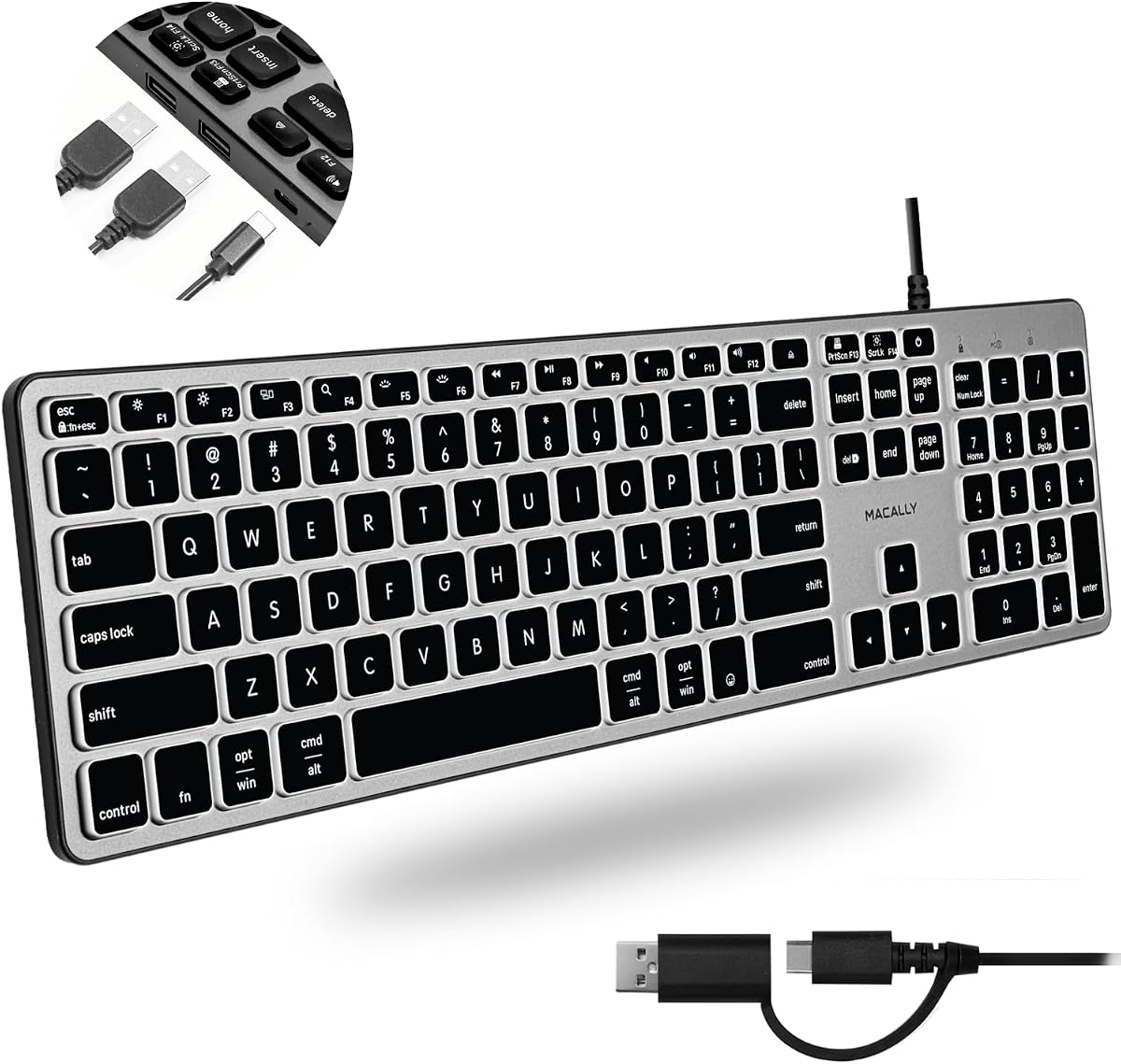
This model stands out as our top choice due to its robust compatibility across multiple operating systems and its inclusion of both USB-A and USB-C ports.
We may earn a commission when you buy through this link, at no additional cost to you.
The keyboard features illuminated keys with adjustable brightness which enhances usability in dim environments while the auto OS detection ensures all keys function correctly without manual setup.
While it comes at a higher price than basic models the versatility provided by the three port hub and universal compatibility makes it a worthwhile investment for multi-device users.
Anyone needing a reliable keyboard that bridges the gap between Mac and PC ecosystems while offering convenient device charging and data transfer options should consider this option.
The auto OS detection feature automatically adjusts key mappings for Mac Windows and Android systems saving you time during setup and daily use.
With two USB-A ports and one USB-C port integrated into the design you can connect peripherals directly to the keyboard reducing the need for separate hubs.
We may earn a commission when you buy through this link, at no additional cost to you.
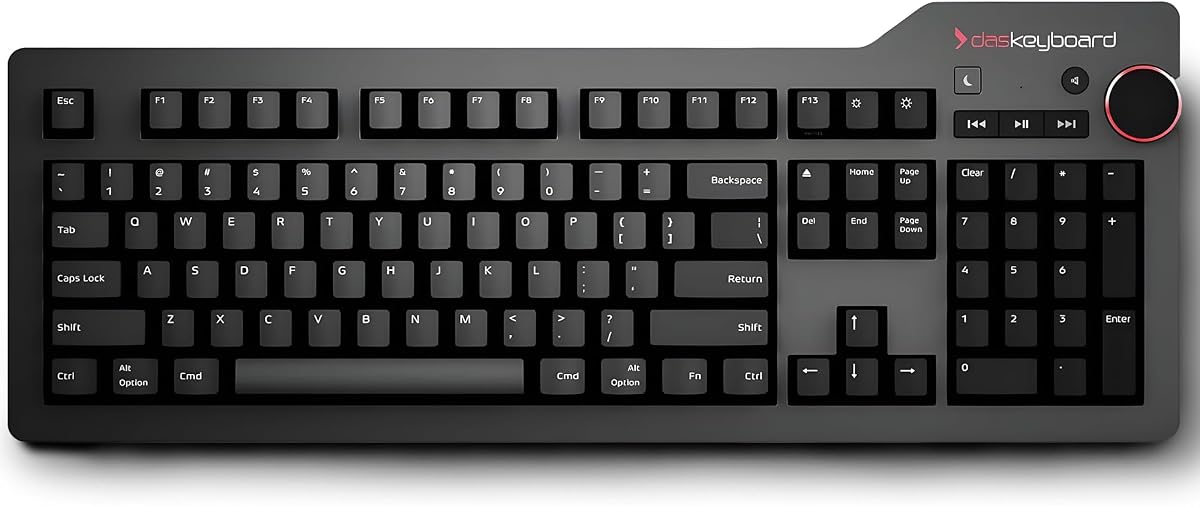
For professionals seeking a luxury typing experience this mechanical keyboard offers Cherry MX Blue switches that deliver tactile and audio feedback for precise keystrokes.
We may earn a commission when you buy through this link, at no additional cost to you.
It includes a blazing fast USB 3.0 hub that allows for rapid data transfer and charging while the dedicated volume knob provides convenient audio control during multimedia tasks.
The aluminum top and high build quality ensure longevity but the device is quite heavy and the mechanical switches may produce sound that could bother nearby colleagues.
Ideal for home offices or dedicated workstations where typing comfort and high-speed connectivity are priorities over portability and silent operation.
The Cherry MX Blue switches provide a distinct click and bump that confirms each keystroke enhancing typing speed and accuracy for long sessions.
Transfer large files and charge devices at speeds up to ten times faster than USB 2.0 thanks to the integrated high-performance USB 3.0 hub.
We may earn a commission when you buy through this link, at no additional cost to you.
This keyboard is the clear winner for budget-conscious buyers offering a reliable full-size layout and comfortable typing experience without extra costs.
We may earn a commission when you buy through this link, at no additional cost to you.
It features a spill-resistant design and is built with recycled plastic which adds to its durability and environmental appeal while remaining extremely easy to set up.
While it lacks the USB hub features found in higher-end models it excels in basic functionality and reliability making it perfect for standard office or home tasks.
Choose this if you need a straightforward keyboard that works well with Windows systems and prioritizes value and ease of use over advanced connectivity.
Simply plug the keyboard into a USB port and start typing immediately without needing to install any drivers or additional software.
The keyboard is designed to handle accidental liquid spills protecting internal components and extending the lifespan of the device in busy environments.
We may earn a commission when you buy through this link, at no additional cost to you.
The Adesso keyboard is a great option for Windows users who want quick access to media controls and multiple USB ports without breaking the bank.
We may earn a commission when you buy through this link, at no additional cost to you.
It features three built-in USB hubs for connecting devices and dedicated multimedia hotkeys that let you control music and video playback with ease.
The membrane switches are quiet and offer decent tactile response though the build feels more basic compared to premium models and Mac support is limited.
This is an excellent choice for multimedia consumers or casual users looking for added connectivity and control features at a reasonable price point.
Access your favorite media players and adjust volume or playback with dedicated keys designed for quick and intuitive control during entertainment.
Use one-touch controls to instantly open applications like My Computer or Calculator without needing to navigate through menus with your mouse.
We may earn a commission when you buy through this link, at no additional cost to you.
This mechanical keyboard offers similar premium features to the Mac version including high-speed USB connectivity and tactile switches suitable for typing and gaming.
We may earn a commission when you buy through this link, at no additional cost to you.
It supports full N-key rollover which ensures that all keystrokes are registered even when multiple keys are pressed simultaneously for fast-paced tasks.
The gold-plated switches and laser-etched keycaps ensure long-term durability and resistance to corrosion though the mechanical switches can be noisy for shared spaces.
Perfect for typists and gamers who require precision and speed along with reliable USB connectivity and media control capabilities on their desk.
Pressing multiple keys at once will not result in missed inputs thanks to full NKRO support which is essential for gaming and rapid typing.
Gold plated switches rated for up to fifty million keystrokes ensure consistent performance and reliability over many years of daily use.
We may earn a commission when you buy through this link, at no additional cost to you.
Designed for Dell business laptops this keyboard provides a reliable replacement with added multimedia keys and USB hub connectivity for office environments.
We may earn a commission when you buy through this link, at no additional cost to you.
It includes a removable palm rest for comfort during long work sessions and two USB ports to connect peripherals directly without needing extra adapters.
While the design is somewhat bulky and geared towards Dell systems it offers excellent durability and functionality for enterprise users needing a spare or replacement.
This is an ideal choice for businesses or individuals looking for a proven Dell compatible keyboard with extra connectivity options.
The included palm rest reduces wrist strain during extended typing and can be easily removed to save desk space when not needed.
Two USB ports allow you to plug in mice or drives directly to the keyboard streamlining your desk setup and reducing clutter.
We may earn a commission when you buy through this link, at no additional cost to you.
The KB216 is a simple multimedia keyboard with a slim profile and convenient multimedia shortcuts designed for basic productivity tasks on compatible systems.
We may earn a commission when you buy through this link, at no additional cost to you.
It features a low-profile chiclet design that fits easily on most desks and includes basic multimedia keys for volume and media control.
Although it does not include USB hubs it offers great value for users who just need a standard reliable keyboard without extra connectivity requirements.
Recommended for users who prefer a quiet sleek keyboard and do not require integrated USB ports for their daily workflow.
The low profile chiclet style keys offer a modern look and comfortable typing feel while keeping the keyboard thin and space efficient.
Access essential media functions with dedicated keys allowing you to manage volume and playback without switching away from your work.
We may earn a commission when you buy through this link, at no additional cost to you.
This keyboard is specifically designed for visibility with fonts that are four times larger than standard making it ideal for visually impaired users.
We may earn a commission when you buy through this link, at no additional cost to you.
The white LED backlight ensures keys are easy to see in dark conditions and the full-size layout maintains familiarity for traditional typists.
It is built with spill-resistant features and does not require batteries since it connects via USB providing reliable continuous use without maintenance.
An excellent pick for elderly users or those who need larger clearer keys to type comfortably without straining their eyes.
The large print keys are significantly bigger than standard keyboards making it easier to see and locate letters for users with vision difficulties.
White LED backlighting distributes evenly across keys allowing for comfortable typing even in dark or dimly lit environments.
We may earn a commission when you buy through this link, at no additional cost to you.
This model offers a modern USB-C connection which is essential for newer Macs and iPads while still providing traditional USB-A ports for other devices.
We may earn a commission when you buy through this link, at no additional cost to you.
The keyboard features a space gray finish and low profile design that matches Apple aesthetics and includes quiet scissor switches for comfortable typing.
While the auto OS detection is not as robust as other models it covers Mac PC and Chrome well and comes with lifetime support for added security.
Ideal for users with USB-C focused setups who need a stylish reliable keyboard that can also serve as a mini hub for peripherals.
The USB-C connection ensures seamless integration with newer laptops and devices that have transitioned away from traditional USB-A ports.
Two USB-A ports allow you to connect additional peripherals directly to the keyboard reducing cable clutter on your desk.
We may earn a commission when you buy through this link, at no additional cost to you.
This mini keyboard is perfect for limited desk spaces offering two USB hubs without the bulk of a full-size keyboard and number pad.
We may earn a commission when you buy through this link, at no additional cost to you.
It features high quality ABS key caps with UV coating and a five-foot cable that provides flexibility for connecting to computers under or on desks.
The compact design is ideal for travel or smaller workstations though users relying heavily on a numeric pad may find the layout restrictive.
Choose this for a streamlined workspace where saving space and adding USB ports are more important than having a full numeric keypad.
The mini design removes the number pad to save desk space making it ideal for smaller setups or travel while retaining essential typing keys.
Two built-in USB hubs let you connect extra devices like mice or drives directly to the keyboard adding flexibility to your setup.
We may earn a commission when you buy through this link, at no additional cost to you.
Choosing the right keyboard with USB ports involves considering your specific needs regarding connectivity layout and typing style.
Consider how many USB ports you need and whether they should be USB-A or USB-C to match your devices. Some keyboards offer two ports while others offer three or more with different combinations.
Look for keyboards with enough ports to connect your mouse and other accessories without needing a separate hub.
Ensure the keyboard is compatible with your OS such as Windows macOS or ChromeOS. Some keyboards have dedicated keys or auto-detection features that adapt to different systems seamlessly.
Check for OS-specific layouts or shortcut keys to avoid functionality issues during daily use.
Decide if you need a full-size keyboard with a number pad or a compact model that saves space. Mini keyboards are portable but lack a number pad which might be essential for some users.
Choose a layout that fits your workspace and typing habits to maintain productivity and comfort.
Select between membrane mechanical or scissor switches based on your preference for tactile feedback and noise. Mechanical switches offer durability and distinct feedback while membrane switches are quieter.
Consider how loud the switches are if you work in a shared environment or need a quiet typing experience.
Look for keyboards with spill-resistant designs and durable materials such as high-quality ABS plastic or aluminum tops. These features extend the lifespan of the keyboard against accidents and daily wear.
Prioritize models with sturdy construction and long lifespans for keystroke ratings to ensure reliability over time.
Check for extra features such as multimedia hotkeys backlighting for low light typing or adjustable tilt legs for ergonomic comfort. These add convenience but may increase cost.
Identify which additional features are useful to you to balance functionality with your budget.
Ensure the USB cable is long enough to reach your computer comfortably whether it sits on or under your desk. Longer cables provide better flexibility for setup.
Choose a keyboard with the appropriate connector type for your current and future devices.
Consider the warranty period and customer support options offered by the manufacturer. Some brands provide extensive support which can be helpful if issues arise.
Opt for models with reliable warranties to protect your investment and ensure peace of mind.
Connect the keyboard to your computer via the USB cable and if your OS does not auto-detect configure the key mappings manually in system settings.
Use the integrated USB ports to plug in peripherals like mice or flash drives which helps reduce cable clutter on your desk.
Clean the keyboard regularly with a soft dry cloth or compressed air to remove dust and debris keeping the keys and ports functioning properly.
Not always but keyboards with two or three USB ports can replace a small hub for basic peripherals. They are convenient for connecting a mouse and flash drive directly though heavy use may still require a full hub for more devices.
Many modern keyboards with USB ports are compatible with Macs but check for dedicated Mac layouts or auto OS detection features to ensure all keys work correctly without manual configuration.
Typically keyboards with USB ports support two to three connected devices like mice or flash drives. The exact number depends on the model and port specifications listed in the product details.
Most USB ports on keyboards can charge devices but data transfer speed may vary. Check if the port supports USB 3.0 for faster data transfer alongside charging capabilities.
Try unplugging and replugging the keyboard or test the ports with different devices. If issues persist check your computer's USB settings or try a different USB port on the computer.
Wireless keyboards rarely include USB ports since they rely on battery power and wireless connection. Most keyboards with USB hubs are wired to supply power to connected devices and the keyboard itself.
This depends on the computer and keyboard. Some systems allow charging via USB even when off if supported. Check your computer's manual for USB power settings to confirm this feature.
USB 3.0 is faster and more efficient for data transfer and charging than USB 2.0. If you need high-speed data or fast charging opt for keyboards with USB 3.0 hubs.
We highlighted the Macally Wired Keyboard as the top choice for its versatility along with the Logitech K120 for budget and Das Keyboard 4 for premium needs.
Consider what matters most to you whether it is port variety typing comfort or operating system compatibility when making your final selection from this list.
Remember that availability and pricing can change so verify current offers before purchasing to ensure you get the best deal on your chosen model.