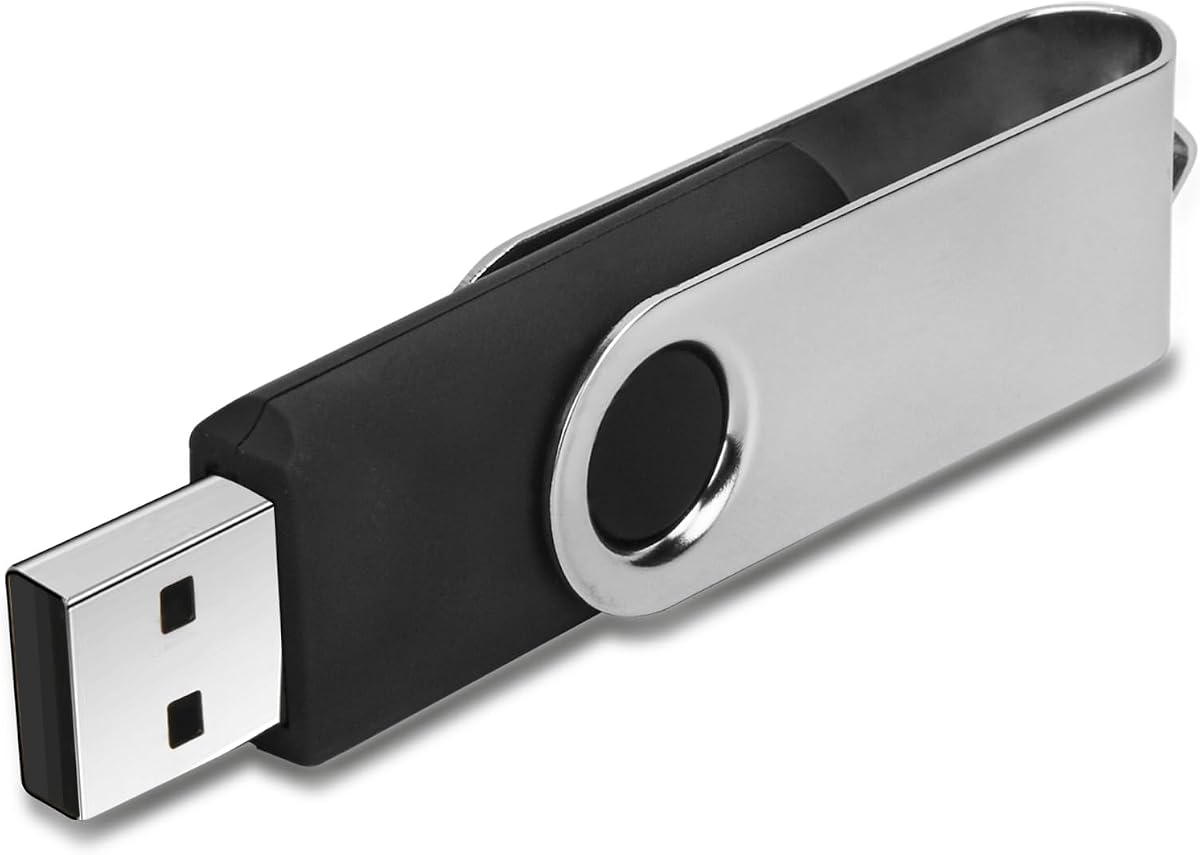
Swivel Design 16GB USB Flash Drive
4.6Editor score
Metal swivel cap protects connector
Keychain design for easy carrying
FAT32 format ready out of box
This guide compares the top FAT32 USB flash drives for compatibility and speed to help you find the perfect portable storage solution for any device in October
Finding a reliable FAT32 USB flash drive is essential for seamless data transfer across various devices. These drives offer broad compatibility with older systems and modern computers alike, ensuring your files are accessible anywhere without complex formatting issues or driver installations required for operation.
We evaluated ten top-rated models based on transfer speeds, build quality, and universal device support. Our analysis covers everything from rugged metal designs to compact swivel options, ensuring you find a drive that meets your specific storage needs while maintaining the critical FAT32 format for maximum accessibility.
Each pick highlights unique strengths like dual USB-C adapters or high-speed USB 3.0 performance for efficient file management. Please note that product availability and pricing fluctuate frequently, so checking current stock levels before purchase ensures you secure the best value for your specific storage requirements today.
4.6Editor score

4.5Editor score

4.7Editor score
Compare key specifications and features across all ten models to find the perfect balance of speed capacity and durability for your specific workflow needs.




This drive stands out as a top choice due to its combination of speed and versatility. With a rating of 4.5 stars it has proven its reliability among users who need fast access to files across different systems. The inclusion of a USB-C adapter makes it particularly valuable for modern laptops that lack traditional USB ports.
We may earn a commission when you buy through this link, at no additional cost to you.
Performance is where this model shines with read speeds reaching up to 105MB/s which is ten times faster than standard USB 2.0 drives. The metal design not only looks professional but also aids in heat dissipation during large file transfers ensuring consistent performance even under heavy workloads over extended periods.
While the adapter is convenient it is small and could easily be misplaced if not secured to the main drive. Additionally the metal construction makes it slightly heavier than plastic alternatives which might matter if you prioritize extreme portability in your daily carry accessories setup.
This drive is ideal for professionals students or photographers who need to move large files quickly between Macs PCs and modern devices. If you value speed and future-proofing with a USB-C option this model offers the best balance of features and price in our current lineup.
The included USB-C adapter ensures you can plug into modern laptops without needing extra cables.
Textured metal casing dissipates heat efficiently allowing for sustained high-speed performance.
We may earn a commission when you buy through this link, at no additional cost to you.
This drive is purpose-built for compatibility with older hardware that may not support USB 3.0 protocols. With a 4.5 star rating it offers dependable performance for basic file storage tasks. The LED indicator provides visual confirmation that data is being written which is helpful for preventing accidental unplugging.
We may earn a commission when you buy through this link, at no additional cost to you.
The plastic design makes it extremely lightweight and easy to carry in a pocket or bag. While it lacks the high speeds of newer models it perfectly serves needs like transferring documents or music files where speed is not critical. The hanging rope slot allows you to attach it to a lanyard securely.
The main limitation is the slower USB 2.0 speed which means transferring large video files will take significantly longer. Also plastic casings are more prone to cracking if dropped compared to metal options making it less robust for rough physical handling conditions.
Choose this drive if you frequently connect to older car stereos cassette players or legacy desktop computers. It is an affordable and reliable choice for users who prioritize compatibility over raw transfer performance and need a simple storage solution.
The red LED flashes during transfers so you know exactly when it is safe to remove.
Optimized for USB 2.0 interfaces ensuring broad compatibility with older systems.
We may earn a commission when you buy through this link, at no additional cost to you.
As the top budget pick this drive offers impressive value with a 4.6 star rating despite its lower price. The swivel cap design is a standout feature that eliminates the risk of losing a separate cap which is a common issue with other drives. Its compact metal body feels sturdy in hand.
We may earn a commission when you buy through this link, at no additional cost to you.
The metal swivel cover provides excellent protection for the USB connector when not in use. This design choice makes it highly portable as you can clip it directly to your keys or bag without worrying about extra accessories. It supports both Windows and Mac systems natively.
The capacity is limited to 16GB which may not be enough for large video collections or extensive backups. Also it uses USB 2.0 technology meaning transfer speeds will be slower than USB 3.0 models if you need to move large datasets quickly.
This is the perfect choice for students or casual users who need to store documents small photos or music files. If you want a durable and cheap drive that you can attach to your keys this model delivers reliability without breaking the bank.
The rotating metal cover protects the connector and means there is no cap to lose.
Keychain design ensures you always have access to your files wherever you go.
We may earn a commission when you buy through this link, at no additional cost to you.
This drive focuses on simplicity with a clean design that fits well in any keychain or bag. It features a 4.5 star rating indicating solid user satisfaction for everyday tasks. The red LED light helps you verify when data transfer is active providing peace of mind during use.
We may earn a commission when you buy through this link, at no additional cost to you.
The cap design is built to protect the USB interface from dust and oxidation when not in use. It includes a string attachment slot for hanging rope lanyards making it easy to keep track of. The FAT32 format ensures you can plug it in and start using it immediately.
While functional the plastic body does not feel as premium as metal alternatives. The lack of USB 3.0 speeds means it is best suited for smaller files or occasional use rather than frequent heavy data transfer needs.
This is a good option for general storage needs where cost and basic functionality are the main priorities. It is reliable for storing documents or media files for occasional transfer between computers or compatible USB devices.
The red LED flashes during transfers so you know exactly when it is safe to remove.
String slot allows you to attach a lanyard so you never lose the drive.
We may earn a commission when you buy through this link, at no additional cost to you.
Getting two drives for the price of one makes this pack a great value for families or small teams. Each drive has a 4.5 star rating and comes in distinct black or blue colors to help organize different types of files. The metal clip rotates 360 degrees for secure attachment to bags.
We may earn a commission when you buy through this link, at no additional cost to you.
The capless design with the rotating metal clip protects the port while keeping the drive ready for use. This feature prevents the common frustration of losing separate caps. The LED indicator lights up during transfers giving you a clear visual signal of drive activity.
The USB 2.0 interface limits transfer speeds which may be frustrating for large file transfers. While the plastic body is lightweight it may not withstand rough handling as well as metal enclosures over long periods of daily use.
This pack is ideal for households where multiple users need their own portable storage. It is also useful for businesses that need to hand out drives at events or conferences where having two options is convenient.
Black and blue colors help you quickly distinguish between personal and work data files.
The 360 rotating metal clip keeps the drive attached to your bag or keyring securely.
We may earn a commission when you buy through this link, at no additional cost to you.
This drive is designed for minimalists with a tiny metal body that fits easily into a pocket. It has a 4.2 star rating reflecting solid performance for its size. The inclusion of a USB-C adapter ensures it works with both modern and older ports without needing a dock.
We may earn a commission when you buy through this link, at no additional cost to you.
The textured metal body offers durability and style while staying very small and lightweight. USB 3.0 speeds allow for quick file transfers when moving data between computers. The adapter includes lanyards to help you keep it attached to the main drive.
The adapter is small and needs to be managed carefully to avoid getting lost. Some users report lower satisfaction compared to larger models which might indicate minor quality control variances over time.
If you need a pocket-sized drive that works with your new laptop and old PC this is a strong candidate. It is particularly useful for travelers who need to save space in their luggage while maintaining high compatibility.
Measuring only 0.75 inches it stays connected to laptops without blocking other ports.
Included USB-C adapter ensures you can plug into modern devices seamlessly.
We may earn a commission when you buy through this link, at no additional cost to you.
TEWENE offers a robust solution with a dedicated clip that attaches securely to bags or laptops. With a 4.3 star rating it balances speed and convenience well. The USB 3.1 Gen 1 technology allows for efficient transfer of video files and large documents across systems.
We may earn a commission when you buy through this link, at no additional cost to you.
The clip design is exclusive and sturdy providing a convenient way to carry the drive without needing a lanyard. It also includes a USB-C adapter for wider device compatibility. This makes it versatile for use with smartphones laptops and tablets.
The plastic body may not offer the same level of protection as metal drives. The clip mechanism is solid but could be bulky if you prefer a more streamlined shape that fits easily into a tight pocket.
This drive is excellent for office workers and students who need reliable access to files on the go. The combination of USB-C support and a strong clip makes it a practical choice for daily professional use.
Exclusive clip design attaches firmly to bags allowing for easy portability.
USB 3.1 Gen 1 tech ensures videos and large files move quickly.
We may earn a commission when you buy through this link, at no additional cost to you.
This drive offers top-tier performance with read speeds of up to 150MB/s. With a 4.6 star rating it is one of the fastest options available for bulk file transfers. The sleek metal casing adds durability while ensuring efficient heat dissipation during heavy use.
We may earn a commission when you buy through this link, at no additional cost to you.
The 128GB capacity provides ample space for high-definition videos and large software backups. SecureAccess software adds a layer of password protection ensuring your private files remain secure. It can transfer a full-length movie in less than thirty seconds which is exceptional.
The size is larger than compact models which might make it less convenient for keychains. Also it commands a higher price than standard 32GB drives which might not be necessary if you have smaller storage needs.
If you are a professional dealing with large datasets or media files this drive is the premium choice. It is worth the investment for the speed and capacity it provides to boost your productivity.
Transfer a full-length movie in less than 30 seconds with USB 3.0 performance.
SecureAccess software allows you to password protect sensitive files.
We may earn a commission when you buy through this link, at no additional cost to you.
Lexar provides a reliable option with strong security features built in. With a 4.6 star rating it is praised for its DataShield software which allows you to create a password-protected safe for sensitive files. Files deleted from this safe are securely erased.
We may earn a commission when you buy through this link, at no additional cost to you.
The push-button retractor keeps the USB connector safe without needing a separate cap. This design ensures that the port is always protected when not in use. It is lightweight and compact making it easy to carry on a lanyard.
Setting up the password protection requires software download which can be a hassle for non-tech users. The retractable mechanism might wear out over time with frequent use compared to a rigid metal shell.
Choose this drive if you handle confidential data and need robust security features. It is great for corporate use or anyone who wants to ensure private files are protected from prying eyes.
Lexar DataShield creates a password safe and ensures deleted files cannot be recovered.
Push-button mechanism protects the port and removes the need for a cap.
We may earn a commission when you buy through this link, at no additional cost to you.
This drive has an exceptional 4.7 star rating reflecting high user trust in SanDisk reliability. The five-year limited warranty provides long-term peace of mind for buyers. It delivers fast transfer speeds of up to 100MB/s making it suitable for everyday tasks.
We may earn a commission when you buy through this link, at no additional cost to you.
The SecureAccess software allows you to protect private files with password protection ensuring data privacy. It is compatible with USB 2.0 ports ensuring it works with older devices. The black finish is sleek and professional.
Security features require downloading software which might be inconvenient for users who prefer native OS tools. The plastic build is standard and does not offer the premium feel of metal drives available in the same price range.
For users who want a trusted brand with long-term warranty support this is an excellent choice. It is reliable for storing critical documents and media files with peace of mind.
SanDisk backs this drive with a five-year limited warranty for reliable performance.
SecureAccess software lets you create a password protected private vault.
We may earn a commission when you buy through this link, at no additional cost to you.
Selecting the right FAT32 USB flash drive involves balancing speed capacity and durability to match your specific workflow needs.
Capacity is the first factor to consider based on what type of files you plan to store. If you only need to transfer documents or music a 16GB drive is often sufficient and more affordable. For large video files or system backups consider a 32GB or 128GB option to ensure you do not run out of space during transfers.
Always check the usable space which is often slightly less than the advertised capacity due to formatting requirements.
USB 3.0 and 3.1 interfaces provide significantly faster read and write speeds compared to USB 2.0. If you frequently transfer large files like videos or software installers aim for a USB 3.0 model to save time. For simple text document transfers USB 2.0 is adequate and often cheaper.
Faster drives are more future-proof and reduce wait times during data management tasks.
The FAT32 format is universally supported by Windows Mac and Linux systems as well as older devices like car stereos and printers. Ensure your selected drive supports this format natively to avoid the need for formatting which can erase data. Also consider if you need a USB-C adapter for modern laptops.
Checking device compatibility before buying ensures you can use the drive immediately without extra steps.
Metal housings offer better durability and heat dissipation than plastic cases. This is particularly important if you use the drive daily or carry it in a pocket where it might face physical stress. A swivel cap or keychain design helps prevent loss and protects the connector.
Prioritize sturdy construction if you plan to take the drive with you frequently.
For sensitive data look for drives that include password protection software like SecureAccess or Lexar DataShield. These tools allow you to create encrypted folders ensuring only authorized users can access your files. Built-in security is better than relying solely on external tools.
Security is essential for professionals storing private or confidential business information.
Standard USB-A connectors are the most compatible with legacy systems. However modern laptops often only have USB-C ports so checking for a dual interface model or included adapter is crucial. Some drives now feature both USB-A and USB-C ports directly for maximum flexibility.
A versatile connector ensures you can use the drive with your current and future devices.
Look for drives that come with a solid warranty such as one year or longer to protect against defects. Brands like SanDisk offer five-year limited warranties which indicate confidence in their product durability. Good warranty support saves money if the drive fails unexpectedly.
Always check the warranty terms before purchase to ensure you are covered.
Budget drives are affordable but may sacrifice speed or durability. Premium drives offer faster speeds and security features but cost more. Consider how often you use the drive to decide if the extra cost is worth it for your workflow needs.
Balancing cost with performance ensures you get the best value for your budget.
To use your drive simply plug it into an available USB port on your computer or device. It will automatically appear in your file explorer as a removable drive where you can copy and paste files. Eject it safely through the system tray before unplugging to prevent data corruption.
Keep the drive away from extreme heat moisture or dust to maintain its longevity. If you have a cap or swivel cover always secure it when not in use to protect the connector from damage. Avoid bending the USB plug sharply to ensure a secure connection.
Regularly format the drive if you notice errors or slow performance to restore optimal function. Store your data in organized folders to make it easier to find files quickly. Using the drive in a dry and cool environment helps prevent electronic issues.
FAT32 is compatible with almost all devices including older ones but has a file size limit of 4GB. exFAT removes this limit but is less widely supported on older systems and some media players. Choose FAT32 for maximum compatibility and exFAT for large files.
Yes FAT32 is universally recognized by both Mac and Windows operating systems without any additional software. This makes it the ideal format for sharing files between different computer types. Just ensure you format the drive correctly for cross-platform use.
Slow speeds are often due to using a USB 2.0 port instead of USB 3.0 or having too many files causing fragmentation. Also transferring many small files takes longer than one large file. Check your port type and try formatting the drive to improve speed.
Try using the disk error checking tool in your computer settings to scan and repair the drive. You can also run command prompt commands like chkdsk to fix file system errors safely. If issues persist formatting the drive may restore functionality but will erase data.
Yes USB 3.0 drives offer significantly faster read and write speeds compared to USB 2.0 models. They are backward compatible so they work with USB 2.0 ports but speed limits apply. For large transfers always use a USB 3.0 port to get full speed.
You can store executable files but some systems may restrict running them directly from a USB drive for security. Ensure your drive is trusted and properly formatted. FAT32 supports standard executables as long as file size limits are respected.
Choosing the right FAT32 USB flash drive depends on your balance of speed capacity and durability needs. Our top picks cover everything from budget-friendly 16GB options to high-speed 128GB models with security features for professionals. The included adapters and swivel designs ensure you stay connected anywhere you go.
Prioritize USB 3.0 speeds and metal build quality if you use the drive frequently for work. If compatibility with older devices is key look for models that explicitly support legacy systems and formats. Always check warranty terms to ensure you have protection against defects.
Remember to verify current stock levels and compatibility with your devices before making a purchase. Prices and availability change often so checking the latest details ensures you get the best value for your specific storage needs.