
NIMO 15.6'' AI Ready Laptop
4.8Editor score
Affordable Price Point
Quiet Efficient Processor
Full Stack I/O Ports
Finding the right laptop for karaoke gear involves balancing audio processing power display clarity and connectivity options. You need a machine that handles streaming apps smoothly while supporting external microphones and speakers effectively.
We evaluated ten top models based on processor speed memory capacity display quality and port availability. Each pick offers unique strengths for home studios mobile setups or large party environments.
Each review highlights specific features that matter for vocal performance and music playback. Prices and availability change frequently so check current listings before making your final decision.
4.8Editor score

4.5Editor score

4.5Editor score
As an Amazon Associate we earn from qualifying purchases.
This side-by-side comparison highlights key specifications across all ten models to help you quickly identify the device that best fits your specific karaoke requirements.






The HP 17 inch Business Laptop Computer holds our top spot due to its impressive screen real estate and robust processing power. With a 4.5 rating from verified users it consistently delivers reliable performance for media consumption and creative tasks.
We may earn a commission when you buy through this link, at no additional cost to you.
Its 17.3 inch Full HD display provides vivid colors and sharp details essential for viewing karaoke lyrics and video tracks simultaneously. The AMD Ryzen 5 CPU combined with 16GB RAM ensures smooth multitasking even when running multiple browser tabs and streaming applications.
While it lacks a dedicated graphics card the integrated graphics are sufficient for standard karaoke software and video streaming. The long battery life allows you to host sessions without constantly hunting for power outlets.
This device is ideal for home entertainment centers or mobile DJs who prioritize screen size and performance. Its durable design and comprehensive port selection make it a versatile choice for various karaoke setups.
The anti-glare display reduces eye strain during long singing sessions while maintaining vibrant color accuracy for media playback.
Built-in AI tools help organize setlists and lyrics while the full keyboard layout supports efficient text entry.
We may earn a commission when you buy through this link, at no additional cost to you.
The NIMO 15.6 AI Ready Laptop stands out as an affordable yet capable option for casual karaoke singers. Its high 4.8 rating reflects user satisfaction with its silent operation and reliable connectivity.
We may earn a commission when you buy through this link, at no additional cost to you.
Powered by a silent 4-core Intel processor this device handles music playback and lyric streaming without fan noise distractions. The full-stack I/O suite eliminates the need for adapters when connecting external microphones or speakers.
While storage is limited to 256GB you can expand via Micro SD slots for your music library. The backlit keyboard ensures comfort during late night practice sessions in dimly lit rooms.
This laptop is perfect for beginners or those with budget constraints who still want quality hardware. Its durability and two-year warranty offer peace of mind for daily use.
Energy-efficient components reduce noise pollution allowing you to focus on vocals without background fan hum.
Multiple USB and HDMI ports support direct connections to audio interfaces and displays without dongles.
We may earn a commission when you buy through this link, at no additional cost to you.
The HP OmniBook 3 16 inch Laptop PC offers a premium experience with its stunning 2K touchscreen display. Users rate it 4.5 stars for its vivid visuals and responsive touch interface perfect for interactive karaoke apps.
We may earn a commission when you buy through this link, at no additional cost to you.
Advanced AI noise reduction ensures clearer voice input during video calls or recording sessions. The battery life exceeds fourteen hours giving you ample time for extended entertainment without recharging.
While the 8GB RAM is adequate for most tasks it may limit performance when running resource-intensive production software. However the fast charge feature quickly restores power when you need to get back in the zone.
This device suits users who value screen quality and modern features. The sleek design and touch functionality make navigating song lists and effects intuitive and enjoyable.
The 2K touchscreen allows direct interaction with lyrics and playlists for a seamless user experience.
AI noise filtering isolates your voice from background sounds improving recording and streaming quality.
We may earn a commission when you buy through this link, at no additional cost to you.
This model repeats as a strong contender due to its balanced feature set. It maintains a 4.5 rating thanks to its reliability and comprehensive software preloads for productivity and entertainment.
We may earn a commission when you buy through this link, at no additional cost to you.
The Wide Vision 720p camera paired with digital microphones captures clear video for online performances. Long battery life combined with fast charge ensures uninterrupted sessions even when power sources are scarce.
The brushed keyboard offers tactile feedback beneficial for typing song lists or managing playlists. While speakers are functional external audio equipment is recommended for high fidelity sound.
It is best suited for those who need a daily driver that doubles as a karaoke machine. The included Office 365 adds extra value for organizing events and managing files.
Integrated digital microphones enhance audio clarity for video calls and live streaming performances.
Fast Charge technology restores battery quickly ensuring you are ready for the next session.
We may earn a commission when you buy through this link, at no additional cost to you.
The Dell Pro 15.6 Laptop offers responsive performance thanks to DDR5 memory and a fast NVMe SSD. Users appreciate its fluidity in handling everyday tasks and media streaming for karaoke apps.
We may earn a commission when you buy through this link, at no additional cost to you.
A 120Hz refresh rate ensures smooth scrolling through lyric databases and responsive touch interactions. The SD card slot provides convenient media transfer from cameras or other devices.
While the chassis is functional it lacks premium aesthetics compared to other models. Speakers are tuned for calls which is adequate but not exceptional for music playback.
This machine fits users prioritizing speed and multitasking capability. The reliable performance makes it a solid choice for managing complex karaoke playlists efficiently.
High refresh rate reduces motion blur ensuring smooth visual transitions during video playback.
DDR5 memory handles large files and multiple apps simultaneously without noticeable lag.
We may earn a commission when you buy through this link, at no additional cost to you.
This model prioritizes screen size and battery life making it great for long sessions. It receives a 4.5 rating for consistent performance and clear communication tools.
We may earn a commission when you buy through this link, at no additional cost to you.
The 17.3 inch display provides ample space for viewing lyrics and music videos simultaneously. Advanced noise reduction ensures your voice is captured clearly even in noisy environments.
Processing power is sufficient for light gaming and streaming but may struggle with heavy video editing. Fast charge capabilities restore half battery in just 45 minutes.
Ideal for casual users who need a large screen without breaking the bank. The extended battery life supports portable setups without constant recharging.
14 hour life allows full days of use without needing a power outlet.
AI personal mode tracks voice and filters noise for clear conference calls.
We may earn a commission when you buy through this link, at no additional cost to you.
The HP 255 G10 Laptop offers a balanced package of portability and performance. With a 4.2 rating it is recognized for reliability and straightforward functionality.
We may earn a commission when you buy through this link, at no additional cost to you.
Its thin design makes it easy to transport to gigs or rehearsals. The AMD Ryzen 3 processor handles daily tasks smoothly while supporting up to 64GB RAM for future expansion.
Radeon graphics provide decent performance for light editing and media consumption. The LED-backlit display ensures crisp visuals in various lighting conditions.
This model is suitable for users who need a lightweight device for on-the-go use. Upgrade options allow you to customize specs as your needs grow.
Lightweight chassis makes traveling to venues or friends homes effortless.
Support for high RAM and storage allows long-term adaptability.
We may earn a commission when you buy through this link, at no additional cost to you.
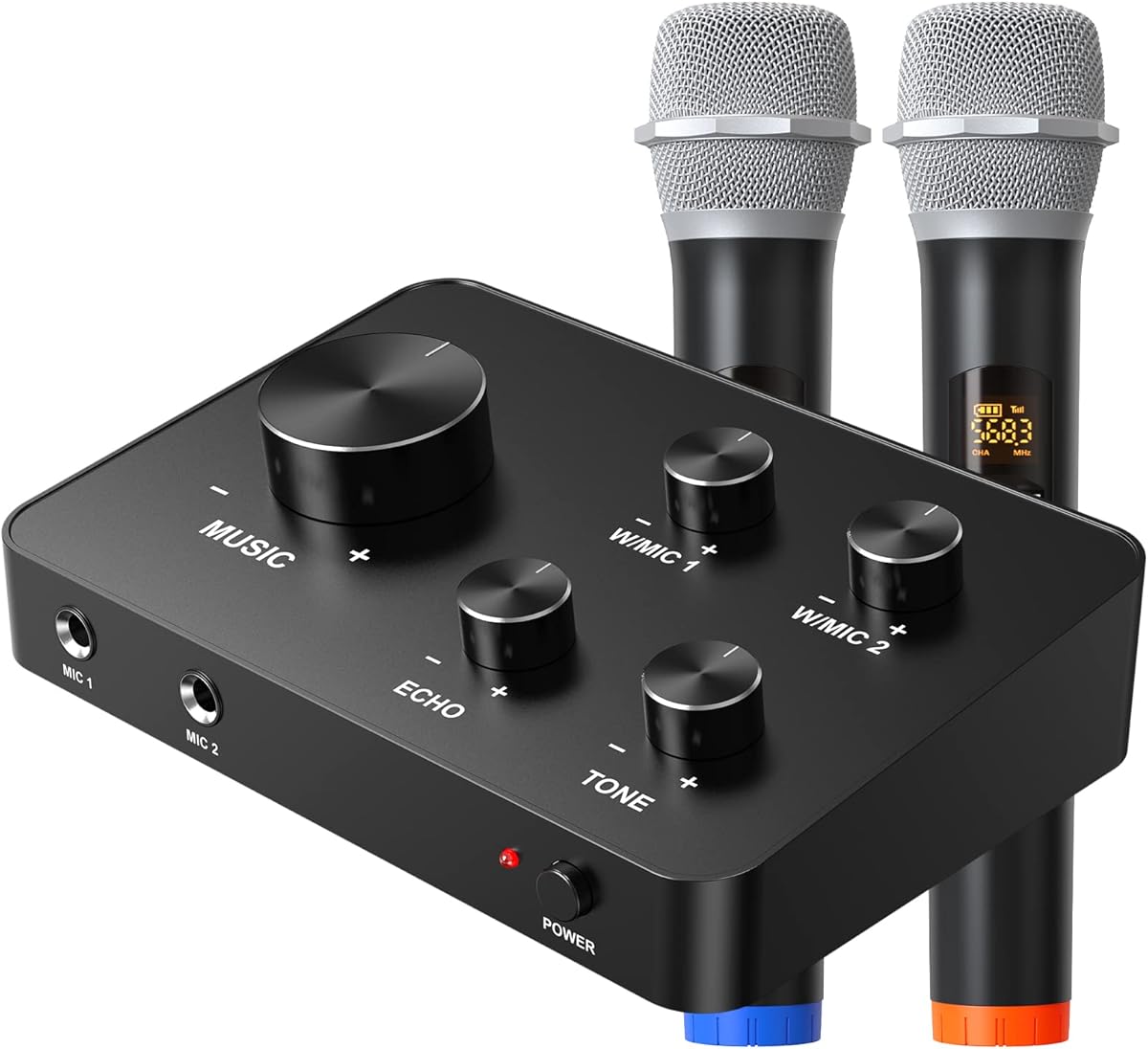
The Rybozen Wireless Microphone System acts as a crucial link between your laptop and speakers. It enables wireless singing without the clutter of cables.
We may earn a commission when you buy through this link, at no additional cost to you.
Two handheld wireless microphones allow duets and group performances easily. The 100Ft range provides freedom to move around while singing.
Adjustable dials let you fine-tune volume and echo levels. While setup may take patience the freedom it offers is invaluable for parties.
This system complements any laptop setup by adding professional audio flexibility. It transforms your home into a flexible karaoke stage.
UHF range ensures stable connection without signal drops during movement.
Works with TVs computers and home theater systems for versatile integration.
We may earn a commission when you buy through this link, at no additional cost to you.
This mixer serves as an advanced audio hub for complex setups. It allows you to connect multiple devices and microphones simultaneously.
We may earn a commission when you buy through this link, at no additional cost to you.
HD Audio Return Channel extracts audio from smart TVs for seamless blending with vocals. Support for Bluetooth and optical inputs increases compatibility with various speakers.
While the interface is feature-rich it may require careful tuning to balance levels. Independent volume controls ensure each element sounds perfect.
Ideal for users with multiple audio sources who need precise control. It transforms a basic laptop setup into a professional sound system.
ARC feature extracts TV audio to mixer for enhanced sound quality.
Multiple ports allow connecting guitars phones and microphones at once.
We may earn a commission when you buy through this link, at no additional cost to you.
This handheld mic is a portable solution for instant fun. It features built-in sound processing and lighting effects for a complete package.
We may earn a commission when you buy through this link, at no additional cost to you.
With 10 hours of battery life you can sing for long events without interruptions. The DSP chip ensures rich bass and clear vocals.
While not as robust as a full mixer it is perfect for casual gatherings. It connects instantly to smartphones for seamless operation.
Great for gifts or travel where carrying a laptop is impractical. It brings joy and fun to any setting effortlessly.
No setup required means you can start singing immediately after powering on.
Dynamic lights and voice effects create an immersive entertainment experience.
We may earn a commission when you buy through this link, at no additional cost to you.
Selecting the right laptop requires evaluating screen size audio output connectivity and processing power to ensure smooth karaoke performances.
A larger display helps you read lyrics clearly while watching music videos. Look for at least 15.6 inches with Full HD resolution to ensure sharp text and vibrant colors.
Prioritize anti-glare screens to reduce eye strain during long sessions in bright environments.
Modern streaming and editing software require efficient processors to run smoothly. Aim for Intel Core i3 or Ryzen 3 equivalents paired with at least 8GB of RAM.
More memory allows you to run multiple apps like browsers and media players without slowdowns during performances.
Karaoke setups often need multiple ports for speakers microphones and external displays. Ensure your laptop has HDMI USB-C and audio jacks for flexible connections.
Wireless options like Wi-Fi 6 and Bluetooth improve convenience when connecting to smart TVs and speakers.
Portability is key if you plan to host karaoke in different rooms or locations. A battery life of 8 hours or more ensures you stay powered throughout the event.
Fast charge capabilities are a bonus allowing quick power-ups between sessions or during breaks.
While external speakers are recommended built-in audio quality affects calls and previews. Look for tuned dual speakers or dedicated audio chips for clearer sound.
High fidelity audio reduces distortion during critical listening and recording sessions.
Frequent use and transport can stress hardware components. Choose a chassis with solid construction and a reliable warranty to protect your investment.
Features like spill-resistant keyboards or reinforced hinges add longevity to the device.
Windows 11 offers improved multitasking tools and app compatibility essential for streaming services. Look for models with Copilot keys or AI integration for easier navigation.
Regular updates and security features keep your data safe while managing large media libraries.
Balancing cost with performance ensures you get the best deal without overspending. Consider models that offer upgrade paths for storage or memory to extend usability.
Review user feedback to gauge real-world reliability before committing to a purchase.
Connect external speakers and microphones to your laptop via HDMI or USB ports before starting your karaoke software. Ensure all cables are secure to prevent interruptions during performances.
Adjust audio settings in your operating system to balance microphone volume and music playback. Use equalizers if available to fine-tune sound output for your specific room acoustics.
Regularly update your software and drivers to maintain performance and security. Clean vents and screens periodically to prevent dust buildup and ensure optimal cooling.
No dedicated graphics card is typically required for standard karaoke apps or streaming services. Integrated graphics in modern processors are sufficient for handling video playback and lyrics rendering efficiently.
Most laptops support standard USB or 3.5mm microphones directly. Check port availability and compatibility before connecting to ensure smooth audio input during performances.
A screen size of 15.6 inches or larger is recommended for comfortable viewing of lyrics and video content. Larger screens reduce eye strain and allow better multitasking during sessions.
Use an HDMI cable to connect your laptop to the TV for video output. Alternatively wireless casting via Wi-Fi 6 or Miracast can work if both devices support it.
External storage is useful if you have a large music library that exceeds internal capacity. Many models support Micro SD cards or USB drives for easy expansion.
Yes most modern laptops support Android apps via Google Play or web-based apps. This compatibility ensures you can use your favorite karaoke tools across devices.
Use microphones with noise cancellation or built-in software features to filter background sounds. Ensure your recording environment is quiet for cleaner vocal captures.
A warranty of at least one year covers manufacturing defects and ensures support. Consider models with extended warranty options for better protection against accidental damage.
We highlighted ten top contenders ranging from large-screen performers to portable audio solutions. Each option balances processing power display quality and connectivity to suit different needs.
Prioritize display size and processing power if you host large events. For casual use focus on battery life and ease of setup.
Remember that prices fluctuate regularly so check current listings to ensure you get the best deal available at the time of purchase.