
Creality Ender 3 V3 SE
3.8Editor score
CR Touch auto leveling sensor
250mm/s fast print speed
3-step quick assembly process
This guide compares the top auto bed leveling 3D printers for beginners, evaluating ease of use, speed, and build quality to help you choose the right machine
Finding the right 3D printer can be overwhelming for newcomers who want reliable results without complex calibration. Auto bed leveling technology simplifies the setup process, ensuring the first layer adheres perfectly every time. This guide highlights models designed specifically for ease of use and consistent performance in home environments.
We have analyzed ten leading printers based on their leveling systems, build quality, speed, and user feedback. Each entry represents a distinct approach to beginner-friendly design, from budget-friendly options to high-speed advanced machines. Our goal is to provide a clear comparison that helps you identify the best fit for your specific needs.
Each product pick includes detailed insights into features, pros, cons, and ideal use cases to guide your decision. While we focus on performance and usability, remember that market conditions change frequently. Always check the latest pricing and availability directly on the retailer pages before finalizing your purchase decision.
3.8Editor score

4.3Editor score

4.3Editor score
This side-by-side comparison highlights key specifications across ten top-rated printers to help you evaluate speed, build volume, and leveling technology efficiently. Each entry includes essential details tailored to beginners seeking reliability and ease of use.


The FLASHFORGE Adventurer 5M stands out as an exceptional choice for beginners due to its robust auto leveling and impressive speed. With a rating of 4.3, it promises reliable performance right out of the box. Its full-auto one-click leveling calibrates the bed properly for a perfect first layer every time.
We may earn a commission when you buy through this link, at no additional cost to you.
Key strengths include its ultra-fast Core XY motion system capable of reaching 600mm/s with high acceleration. The upgraded direct extruder and quick detachable 280°C nozzle allow for easy maintenance and fast swaps. Vibration compensation eliminates ghosting while filament run-out and power loss recovery ensure project safety.
While the open frame design limits enclosure options for certain materials like ABS, this works well for PLA and PETG users. Beginners may need to replace nozzles occasionally due to high-speed wear. These trade-offs are acceptable given the speed and ease of setup it offers.
This printer is ideal for hobbyists and students seeking fast, reliable results without manual calibration headaches. The combination of auto leveling and high-speed performance makes it a top recommendation for anyone starting their 3D printing journey today.
The one-click auto leveling ensures precise bed calibration without manual dials, saving time and reducing beginner frustration significantly.
High-speed Core XY motion with vibration compensation delivers sharp prints quickly without sacrificing surface quality or detail fidelity.
We may earn a commission when you buy through this link, at no additional cost to you.
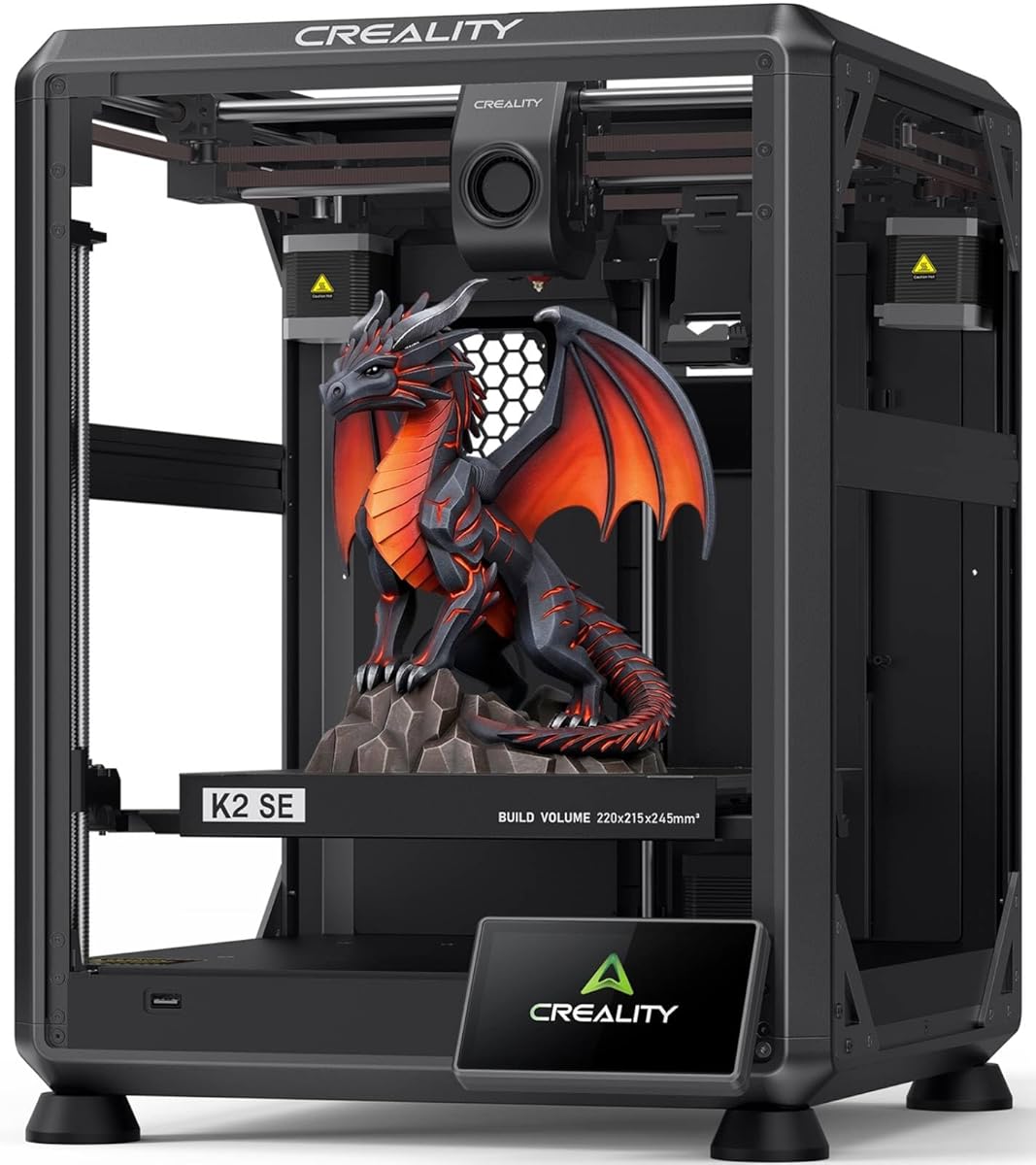
The Creality K2 SE offers a solid metal build and advanced auto leveling features suited for beginners exploring more complex prints. Its 3.8 rating reflects a mix of speed and usability strengths alongside some user-reported setup nuances. The die-cast aluminum frame ensures rigidity during high-speed operations.
We may earn a commission when you buy through this link, at no additional cost to you.
Key strengths include the CoreXY motion system delivering 500mm/s with active vibration reduction for sharper details. The modular direct drive extruder and quick-swap nozzle minimize downtime, while CFS compatibility allows future multi-color expansion. Creality OS and Cloud support simplify remote workflow management.
The separate CFS purchase adds to the overall cost for multi-color enthusiasts. Some users note calibration can take time despite auto leveling. These minor drawbacks do not diminish the printer's core value for those seeking a sturdy, expandable entry point.
Ideal for beginners wanting a reliable, open-frame printer with room to grow into multi-color printing later. Its metal frame and auto leveling make it a practical choice for daily use and educational projects.
Die-cast aluminum frame ensures minimal flex during high-speed movement, delivering accurate prints and long-lasting durability for beginners.
Compatibility with Creality CFS allows seamless expansion to multi-color printing when you are ready to upgrade your capabilities.
We may earn a commission when you buy through this link, at no additional cost to you.
The E-Leveler 2 is a standalone electronic tool designed to simplify manual bed leveling for 3D printers. With a 4.3 rating, it helps beginners achieve precise first layers without expensive sensors. Its LED indicators guide you through adjusting knobs to perfect bed height.
We may earn a commission when you buy through this link, at no additional cost to you.
Key strengths include its visual LED feedback system that lights up to show bed alignment status in real time. The simplified nozzle target and balancing end caps make it easier to use than traditional paper methods. It works with most printers featuring manually adjustable beds.
Since it requires manual adjustments, it lacks full automation features like auto-sensors. Resin and Delta printers are not supported. However, as a low-cost addition, it offers significant value for hobbyists on a tight budget.
This tool is ideal for beginners looking for a reliable manual leveling aid without spending much. It pairs well with entry-level printers needing an upgrade to improve first layer adhesion consistently.
LED indicators provide clear real-time feedback on bed alignment helping beginners calibrate accurately without guesswork or frustration.
This affordable tool offers a cost effective way to achieve level beds on most manual printers without expensive sensor upgrades.
We may earn a commission when you buy through this link, at no additional cost to you.
The FLASHFORGE AD5M delivers beginner-friendly ease with full auto calibration and fast 600mm/s speeds. Rated 4.3, it combines precise printing and maintenance convenience. The all-metal CoreXY structure ensures stability while auto leveling simplifies bed setup to just one click.
We may earn a commission when you buy through this link, at no additional cost to you.
Key strengths include patent quick-release nozzle allowing 3-second swaps for different tasks. The Orca-flashforge slicer supports batch file transmission and multi-printer monitoring. Power loss recovery and double-sided PEI plates enhance usability and print success rates significantly.
Open frame design may limit heated chamber support for engineering materials. Nozzle swapping while fast requires careful handling. These are minor trade-offs given the speed and tool-free maintenance the machine offers daily.
Best for hobbyists wanting reliable performance with minimal setup time. Its auto leveling and quick-swap features make it a top choice for consistent results.
Fully automatic one-click leveling measures nozzle-to-plate distance precisely ensuring flawless first layers without manual calibration effort.
Patent quick-release nozzle swaps in three seconds enabling rapid changes for different print projects and materials easily.
We may earn a commission when you buy through this link, at no additional cost to you.
The QIDI Q2 is a premium beginner-friendly 3D printer featuring a 65°C heated chamber and 370°C nozzle for advanced materials. With a 4.3 rating, it bridges the gap between entry and expert projects seamlessly. The nozzle acts as the leveling sensor delivering unmatched first-layer accuracy.
We may earn a commission when you buy through this link, at no additional cost to you.
Key strengths include the PTC heated chamber minimizing warping and strong layer adhesion for engineering-grade plastics. The CoreXY structure ensures ultra-stable high-speed printing. Triple filtration ensures safe indoor use while multi-color support expands creativity significantly.
The higher price may be steep for hobbyists printing mostly PLA. The many features require some learning curve. These are justified by the performance and versatility for growing users.
Ideal for educators and makers seeking professional results without manual calibration. Its auto leveling and heated chamber make it a top pick for demanding projects.
Unique nozzle as leveling sensor delivers unmatched first-layer accuracy unaffected by bed surface variations ensuring consistent print quality.
Triple filtration system reduces odors and harmful particles making it safe for home and classroom use during extended printing sessions.
We may earn a commission when you buy through this link, at no additional cost to you.
The FLASHFORGE 5M Pro offers a fully enclosed design with auto leveling and dual filtration for safe quiet home printing. Its 4.0 rating reflects reliable performance with high-speed precision. The auto-leveling system ensures flawless first layers without manual calibration effort.
We may earn a commission when you buy through this link, at no additional cost to you.
Key strengths include HEPA13 and carbon filters blocking 99% of particulate matter for clean air. The Orca-Flashforge slicer enables remote monitoring via the Flash Maker APP. Quiet operation allows focus during study or work.
The closed structure adds cost and complexity over open frames. The nozzle bundle is fixed to 0.4 and 0.6mm sizes. These are minor trade-offs for safety and ease of use.
Best for beginners prioritizing safety and quiet operation at home or school. Its auto leveling and enclosed design make it a reliable everyday choice.
Fully enclosed design with dual filtration ensures safe air quality by blocking 99% of particles and VOCs during printing.
Flash Maker APP enables real-time print monitoring and remote management for added convenience across your workspace.
We may earn a commission when you buy through this link, at no additional cost to you.
The Creality Ender 3 V3 SE is a budget-friendly beginner printer with CR Touch auto leveling and fast 250mm/s speeds. Rated 3.8, it offers proven reliability and ease of use right out of the box. Three-step assembly makes setup nearly effortless.
We may earn a commission when you buy through this link, at no additional cost to you.
Key strengths include the Sprite direct extruder for smooth feeding and filament auto loading. Dual Z-axis lead screws and linear shafts ensure stability. Official support service and 24-hour response add confidence for new users.
Some users note manual tuning still needed after auto leveling. Build volume is modest compared to high-end models. Still its cost effectiveness and auto leveling make it a top entry pick.
Ideal for first-time buyers seeking affordable reliable auto leveling. Its quick assembly and proven parts make it perfect for hobbyists on a tight budget.
Three-step assembly gets you from unboxing to first print in just 20 minutes saving time and reducing setup complexity.
Auto filament loading and unloading simplifies changes reducing downtime and making maintenance easier for beginners.
We may earn a commission when you buy through this link, at no additional cost to you.
The Creality CR Touch Kit is an upgrade for manual printers to add auto leveling features. With a 4.4 rating, it offers stable multi-point detection and compensation for first layers. It supports most Ender 3 models requiring firmware updates.
We may earn a commission when you buy through this link, at no additional cost to you.
Key strengths include multi-point detection building a virtual plane to compensate bed tilt automatically. The kit includes brackets nozzles and guides. Reusable over 100000 times it provides long-term value.
Firmware flashing and board compatibility checks are required steps. Resin printers are unsupported. Still it offers a budget-friendly way to add auto leveling to existing printers.
Ideal for users upgrading older Ender printers. Its stability and multi-point features make leveling easier without replacing the whole machine.
Multi-point detection builds a virtual plane to compensate tilt angle improving accuracy across the entire bed surface.
Includes all brackets screws and guides for straightforward installation adding auto leveling without replacing main hardware.
We may earn a commission when you buy through this link, at no additional cost to you.
The FLASHFORGE AD5X is a multi-color beginner-friendly printer with 600mm/s speeds and auto leveling. Rated 4.0, it balances creativity with speed and precision. Its Intelligent Filament System handles refills automatically minimizing downtime during prints.
We may earn a commission when you buy through this link, at no additional cost to you.
Key strengths include four-color printing for intricate designs and CoreXY stability reducing vibration artifacts. Auto leveling ensures perfect first layers while flexible TPU support expands material range. Large build volume aids diverse projects.
Multi-color setup requires additional learning. Material compatibility is narrower than single-color models. Still the creative freedom and speed are worth it.
Ideal for artists and hobbyists wanting vibrant prints. Auto leveling and IFS make it a versatile pick for creative beginners.
IFS ensures seamless filament refills and detection reducing downtime and letting you focus on creative projects without interruptions.
Multi-color capability creates vibrant models for artists and designers enabling complex visuals without manual swaps.
We may earn a commission when you buy through this link, at no additional cost to you.
The Creality Ender 3 V3 SE offers beginner-friendly setup with auto leveling and 250mm/s speeds. Its 4.1 rating reflects balanced performance and quiet operation. CR Touch leveling and auto Z-offset help achieve reliable first layers easily.
We may earn a commission when you buy through this link, at no additional cost to you.
Key strengths include the proven Sprite extruder and flexible PC spring steel plate for easy print removal. Dual Z-axis screws reduce wobble. Silent mainboard minimizes noise for comfortable use.
Speed is slower than high-end models. Build size is modest. These are acceptable trade-offs for its quiet reliable operation.
Best for quiet home printing needs with auto leveling. Its proven design makes it a solid affordable pick for beginners.
Silent 32-bit mainboard minimizes noise for a more comfortable printing experience during study or work hours.
Sprite extruder provides smooth consistent feeding supporting reliable results across a wide range of everyday printing materials.
We may earn a commission when you buy through this link, at no additional cost to you.
Selecting the right auto bed leveling 3D printer requires weighing factors like speed, calibration technology, build volume, and budget. This guide covers the key considerations to help beginners make informed decisions.
Auto leveling ensures perfect first layers without manual dials. Look for one-click sensors or nozzle-based systems that simplify setup and reduce failure rates for consistent results.
Choose printers with reliable CR Touch or proprietary systems that match your experience level and budget constraints.
High-speed Core XY printers like the 5M and K2 SE reach 500-600mm/s for fast projects. Beginners should balance speed with print quality and mechanical stability.
Select speed levels that match your project needs and comfort with calibration and maintenance tasks.
Build volume determines maximum model size. Standard 220mm cubes suit most beginners, while larger volumes allow bigger parts and prototypes.
Choose a build size that fits your workspace and project goals without unnecessary expense.
Closed frames with filtration reduce odors and improve print quality for ABS and PETG. Beginners prioritizing indoor use should favor models like the 5M Pro.
Ensure adequate ventilation or filtration based on materials you plan to print regularly.
Quick-swap nozzles and direct extruders simplify maintenance and filament changes. Beginners benefit from tool-free designs and reliable feed mechanisms like the Sprite extruder.
Select extruders that match filament types and offer durable feeding for consistent extrusion.
Price varies widely. Entry models like the Ender 3 V3 SE offer essential auto leveling affordably, while premium ones add multi-color and heated chambers.
Balance upfront cost against long-term value and feature needs before purchasing.
Modern printers integrate cloud slicing and remote monitoring apps. Features like Orca-Flashforge slicer and Creality OS enhance workflow efficiency and learning.
Choose models with user-friendly software that supports easy file management and remote control.
Responsive customer support and clear warranty terms reduce risk. Creality and FLASHFORGE offer 12-month services and 24-hour responses.
Verify official support channels to resolve issues quickly and maintain printer longevity.
Before first use, ensure the printer is on a level surface and the build plate is clean. Run the auto leveling calibration process using the one-click menu to verify nozzle height and bed alignment.
Monitor the first layer closely to confirm adhesion and print speed settings. Adjust fan speed or nozzle temperature if needed. Regularly check the extruder for filament jams and ensure firmware is updated.
Maintain the machine by cleaning the build plate after prints and replacing nozzles periodically to avoid wear. Keep firmware and slicer software up to date for improved features and safety.
Yes, auto leveling eliminates manual adjustments that often frustrate new users. It ensures perfect first layers consistently, saving time and reducing failed prints significantly for reliable beginner results.
Keep the sensor clean and free from dust or debris. Periodically run calibration tests and replace worn components like springs or screws as needed to maintain accuracy.
PLA is the ideal starting material due to its low warping and ease of printing. PETG and TPU are suitable upgrades once you gain confidence with settings and bed adhesion.
Many auto leveling models feature Core XY systems for faster speeds up to 600mm/s. However, speed depends on mechanical design, not just leveling technology itself.
Yes, kits like the Creality CR Touch enable auto leveling on older Ender models. Ensure motherboard compatibility and be ready to flash firmware before installation.
A heated chamber helps with ABS and PETG but is optional for PLA. Beginners starting with PLA can skip this feature unless planning advanced prints later.
Most printers come with or support popular slicers like Creality Print and Orca-Flashforge. These tools integrate with cloud features for easier workflow and remote monitoring.
Auto leveling typically takes a few minutes and completes before each print job. It is faster and more reliable than manual bed leveling with a feeler gauge.
This guide highlighted ten standout printers including top picks like the FLASHFORGE Adventurer 5M, Creality Ender 3 V3 SE, and QIDI Q2. Each balances auto leveling convenience, speed, and reliability for new users.
Prioritize features matching your needs such as build size, speed, and safety. Budget models like the Ender 3 V3 SE offer great value, while premium options like QIDI Q2 provide advanced flexibility.
Always verify current availability and warranty terms on retailer pages before purchasing. Auto leveling technology simplifies entry into 3D printing significantly for lasting success.