
NZXT H5 Flow
4.6Editor score
Perforated PSU shroud design
Ultra-fine mesh panels
Supports 360mm front radiator
This guide compares the top cooling computer case models for 2026, analyzing airflow design, fan support, and thermal performance to help you choose the right
Finding the right cooling computer case is essential for maintaining peak performance and longevity in your gaming or workstation rig. High-quality chassis designs prioritize airflow paths that efficiently move heat away from critical components like the CPU and GPU during intensive tasks.
We evaluated ten leading models based on airflow efficiency, fan configuration, and build quality. Our analysis focuses on real-world thermal potential, cable management features, and compatibility with modern hardware standards including reverse-connector motherboards and large liquid cooling radiators.
Each pick highlights specific strengths such as modular customization, panoramic viewing, or budget-friendly efficiency. While we provide detailed specifications and performance insights, remember that retail prices fluctuate frequently so always verify current costs before finalizing your purchase decision.
4.6Editor score

4.8Editor score

4.6Editor score
The following table provides a side-by-side comparison of all ten selected cases. Use this overview to quickly assess key specifications like fan count, radiator support, and unique design features before diving into detailed reviews.


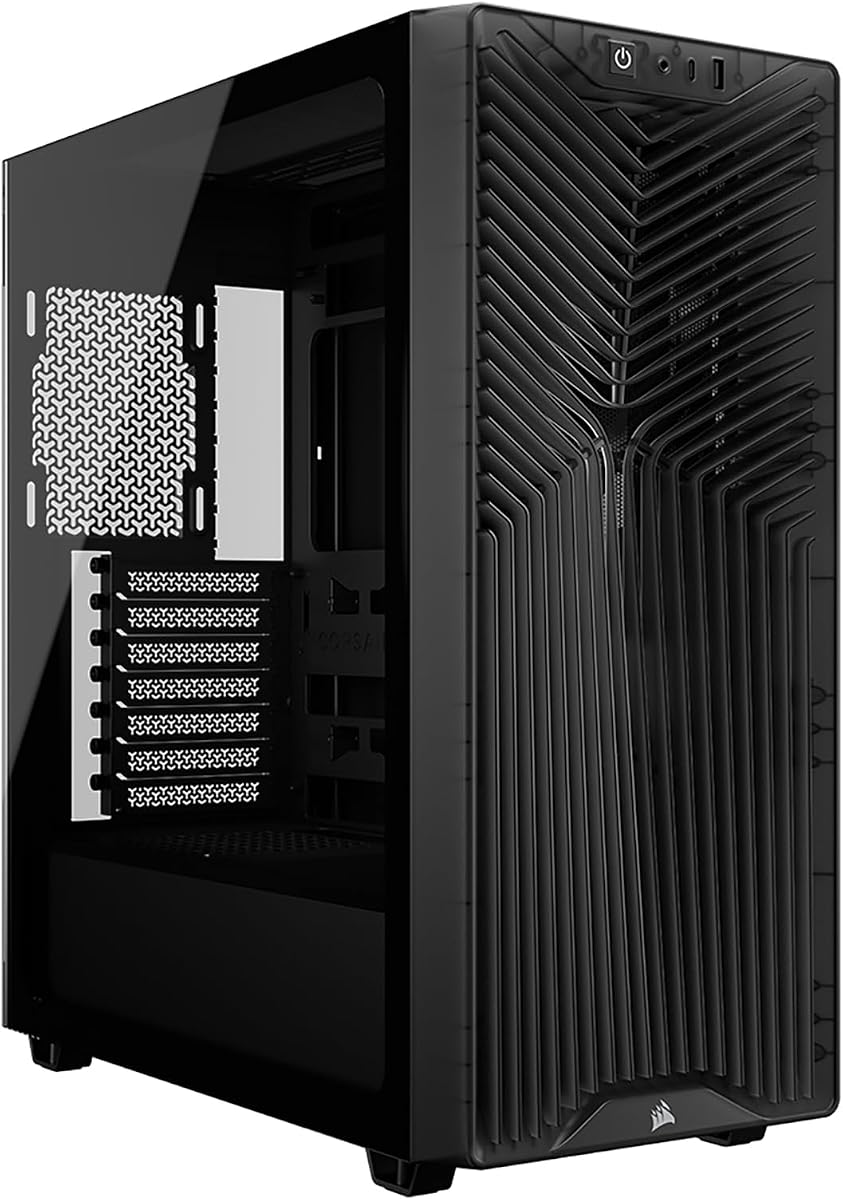


The CORSAIR 4000D RS stands out as a top contender in the modern PC case market with its innovative FRAME system. Rated highly by users, this case offers a unique approach to customization that allows you to modify the chassis over time without replacing the entire unit.
We may earn a commission when you buy through this link, at no additional cost to you.
Its standout quality lies in the InfiniRail mounting system which provides unmatched flexibility for fan placement. The 3D Y-Pattern airflow panel ensures minimal restriction while the pre-installed RS fans deliver efficient thermal performance right out of the box for most builds.
While the modular nature is a strength, it does introduce complexity during initial assembly. The frame system requires careful alignment which might be daunting for first-time builders but the long-term benefits justify the effort for enthusiasts.
This case is ideal for users who value future-proofing and aesthetic flexibility. Whether you prioritize clean cable management or max airflow, the 4000D RS adapts to your needs making it a versatile choice for high-performance gaming rigs.
The FRAME system lets you swap motherboard trays or I/O panels easily so your case evolves with your hardware upgrades without needing a full replacement.
Perforated steel panels and the InfiniRail system work together to create unrestricted air paths that keep component temperatures low during intense gaming sessions.
We may earn a commission when you buy through this link, at no additional cost to you.
The NZXT H5 Flow delivers exceptional value for budget-conscious builders seeking reliable thermal performance. Rated well by enthusiasts, this compact mid-tower case prioritizes airflow efficiency through smart design choices that punch above its weight class.
We may earn a commission when you buy through this link, at no additional cost to you.
Key strengths include the perforated PSU shroud and ultra-fine mesh panels that maximize air intake while filtering dust effectively. The included Quiet Airflow fans provide a solid base though you may want to add more for high-end GPUs.
Trade-offs include the limited stock fan count and lack of RGB lighting which might require additional purchases. However these are acceptable compromises given the competitive pricing and high-quality build materials used throughout the chassis.
Ideal for users who want a clean minimal build without overspending the H5 Flow offers great airflow and expansion potential. It balances cost and performance perfectly making it a top pick for budget gaming systems.
The side and bottom perforations on the PSU shroud allow cold air to intake directly ensuring your power supply runs cooler and more efficiently.
Despite the budget focus the H5 Flow maintains high standards with mesh panels and cable routing that rival more expensive cases on the market.
We may earn a commission when you buy through this link, at no additional cost to you.
The CORSAIR AIR 5400 RS represents the pinnacle of thermal design with its unique triple-chamber architecture. Rated highly for performance this case isolates heat sources to ensure every component receives dedicated cooling airflow for maximum efficiency.
We may earn a commission when you buy through this link, at no additional cost to you.
Its standout features include isolated CPU and PSU chambers plus airflow ducts that increase velocity without adding noise. The panoramic glass provides an unobstructed view of your build while the advanced cooling design keeps temperatures exceptionally low.
The premium price and large size may be prohibitive for smaller setups but the thermal benefits are undeniable. This case is engineered for enthusiasts who demand absolute top-tier cooling and visual presentation.
For those building high-end workstations or flagship gaming rigs the 5400 RS offers unmatched performance. Its innovative layout solves common heat soak issues making it the ultimate choice for cooling enthusiasts.
Separating the CPU GPU and PSU into distinct chambers prevents heat recirculation ensuring each component stays cool even under full load.
Innovative ducts accelerate air velocity forcing it into narrow channels to improve cooling power without requiring louder or faster spinning fans.
We may earn a commission when you buy through this link, at no additional cost to you.
The Antec Flux Pro stands out as a robust full-tower solution designed for maximum cooling capacity. Rated highly by users it includes six PWM fans out of the box ensuring immediate thermal performance for demanding workloads.
We may earn a commission when you buy through this link, at no additional cost to you.
Its key strengths lie in the multi-directional vent design and innovative iShift PSU mount. The CPU/GPU temperature display offers real-time monitoring which adds functionality for enthusiasts who need precise thermal data.
The case combines metal glass and wood for a unique aesthetic texture. Trade-offs include its significant size and weight which may limit placement options in smaller desks or rooms.
Ideal for power users needing E-ATX support this case offers superior expansion. The included fans and cooling features make it a comprehensive solution for high-performance systems.
Having six PWM fans included saves money and ensures optimal airflow right from the start without needing extra purchases for a fully cooled rig.
The integrated dual temperature display allows you to track CPU and GPU heat levels instantly providing better control over your system performance.
We may earn a commission when you buy through this link, at no additional cost to you.
The Cooler Master HAF II 500 redefines airflow with oversized 220mm and 180mm fans designed to move massive volumes of air. Rated highly for cooling power this case excels at maintaining low component temps even with high-performance hardware.
We may earn a commission when you buy through this link, at no additional cost to you.
Its standout feature is the low resistance design using large ventilation openings to maximize throughput. The split-level cable management optimizes space allowing for clean routing alongside the massive rear exhaust fan.
While effective the size and cost are significant factors to consider. The unique GPU holder ensures stability for heavy cards making it a strong choice for multi-GPU setups.
Best for those who prioritize raw cooling performance over aesthetics. If you need to cool hot components without loud fans the HAF II delivers exceptional airflow efficiency.
The large diameter fans move air efficiently at lower speeds providing superior cooling with less noise compared to standard 120mm fans.
Split-level routing creates dedicated zones for cables preventing them from obstructing airflow and improving overall thermal consistency.
We may earn a commission when you buy through this link, at no additional cost to you.
The MSI MAG Forge 321R offers a compelling mix of airflow and lighting control for RGB enthusiasts. Rated well by users it includes ARGB fans compatible with Mystic Light Sync for seamless visual integration.
We may earn a commission when you buy through this link, at no additional cost to you.
Key strengths include support for up to 11 system fans ensuring excellent ventilation. The magnetic dust filter on top makes maintenance easy while the 360mm radiator support allows for advanced liquid cooling.
Trade-offs involve reliance on MSI software for full RGB control which may not appeal to all users. The build materials are functional though not as premium as higher-end models.
Perfect for gamers who prioritize aesthetics alongside cooling. The combination of ventilation and lighting makes this case a great value for RGB-focused builds.
Full compatibility with MSI software allows you to synchronize all RGB components from one dashboard for a unified lighting experience.
Vented front panels combined with mesh top ensure air moves freely through the chassis keeping temperatures stable during gaming.
We may earn a commission when you buy through this link, at no additional cost to you.
The CORSAIR 3200D RS offers a balance of features and value for modern builders. Rated highly it includes three ARGB fans and supports nine total fans providing ample room for custom airflow configurations.
We may earn a commission when you buy through this link, at no additional cost to you.
Its standout features are the GPU Anti-sag Stabilization Arm and single connector for front cables. Reverse-connector support ensures future compatibility with newer motherboards making it a forward-thinking choice.
The smoke tinted side panel reduces light show impact which may be a con for some but helps reduce glare. The included anti-sag arm is a nice touch for heavy GPUs.
Best for those wanting a versatile case without breaking the bank. Its support for modern tech and cooling options makes it a reliable option for mainstream builds.
Designed with reverse-connector motherboards in mind this case simplifies cable routing for compatible boards ensuring cleaner interior aesthetics.
The built-in anti-sag arm prevents heavy graphics cards from drooping protecting components and maintaining stability during operation.
We may earn a commission when you buy through this link, at no additional cost to you.
The CORSAIR AIR 5400 LX shares the premium architecture of the RS model but emphasizes RGB lighting integration. Rated highly for cooling it maintains the triple-chamber design to ensure thermal isolation.
We may earn a commission when you buy through this link, at no additional cost to you.
Its key strengths include the dedicated CPU chamber and airflow ducts that accelerate air speed. The panoramic glass and integrated RGB create a visually stunning showcase for your build.
Trade-offs involve the high cost and size which may exceed typical needs. However for enthusiasts wanting both top-tier cooling and lighting this case offers unique benefits.
Ideal for those who want to show off high-end parts. The combination of thermal performance and aesthetic focus makes it a standout choice for premium builds.
Large glass panels provide an unobstructed view of your components allowing full display of your cooling setup and RGB lighting.
Separating components ensures that CPU heat does not affect other parts keeping your system stable during peak usage.
We may earn a commission when you buy through this link, at no additional cost to you.
The MONTECH XR Panoramic blends style and function with its unique wood-grain I/O panel and panoramic glass. Rated highly for cooling it includes three ARGB PWM fans providing immediate performance.
We may earn a commission when you buy through this link, at no additional cost to you.
Its standout feature is the reverse-blade side fans which present their light face inward for cleaner aesthetics. The panoramic glass keeps your GPU and cooling visible making your build a centerpiece.
Trade-offs include regular maintenance of magnetic filters and a price that reflects the premium look. The GPU clearance ensures you can fit large graphics cards without issue.
Best for users wanting a distinctive look. The blend of warm accents and modern airflow design makes it a unique choice in the PC case market.
Side-mounted fans show their lit surface directly enhancing the visual appeal of your build without exposing motor frames.
The wood-grain I/O area adds warmth to the design creating a unique contrast against the black chassis and glass panels.
We may earn a commission when you buy through this link, at no additional cost to you.
The CORSAIR 3200D RS rounds out our list as a solid all-rounder for thermal management. Rated highly it supports up to nine 120mm fans which ensures exceptional airflow potential for any build size.
We may earn a commission when you buy through this link, at no additional cost to you.
Its standout features include the anti-sag arm and reverse-connector compatibility ensuring support for the latest tech. The three included ARGB fans provide a balanced starting point for cooling and lighting.
Trade-offs involve the smoke glass which reduces visible RGB lighting. Cable space is manageable but may require planning for complex setups.
Ideal for users prioritizing function over flash. The reliable cooling performance and build quality make this case a safe bet for serious gamers and professionals.
Supporting up to nine fans allows you to tailor cooling exactly to your needs whether using air or liquid cooling solutions.
The stabilizer arm ensures heavy GPUs remain level preventing stress on slots and improving overall system longevity.
We may earn a commission when you buy through this link, at no additional cost to you.
Choosing the right cooling computer case requires balancing airflow design component size, and aesthetics. Below are key factors to consider to ensure your build runs cool and stable.
The most critical factor is the case's airflow design. Look for mesh front panels and vented roofs that allow air to enter freely. Cases with perforated panels reduce resistance helping fans push air through efficiently.
Prioritize cases with open front designs over those with solid glass doors unless you plan to upgrade fans significantly.
Check the maximum fan count supported. More mounts mean better cooling potential. Many modern cases support at least six fans allowing for front intake top exhaust and rear exhaust configurations.
Ensure the included fans are PWM controlled for automatic speed adjustment based on temperature loads.
If you plan to use liquid cooling verify the radiator support. Top and front sections should support 360mm radiators for maximum cooling. Larger chambers also allow for 420mm options in high-end cases.
Check clearance depths to ensure radiators do not block RAM or GPU components.
Modern graphics cards are increasingly large. Ensure the case supports GPUs over 350mm. Some models offer 420mm clearance to accommodate flagship cards with bulky coolers.
Look for anti-sag support features to keep heavy cards stable during operation.
Proper cable management prevents airflow restriction. Look for cases with deep channels behind the motherboard tray and tie-down points. A clean interior ensures air flows directly over components.
Reverse-connector motherboards simplify routing but ensure the case supports the specific connector layout.
Effective dust filters protect your components. Magnetic filters are easiest to clean while mesh panels should be removable. Good filtration extends the life of your hardware.
Regular cleaning of these filters maintains optimal airflow performance.
Some cases allow customization like swapping panels or fan mounts. Modular systems grow with your needs allowing you to change airflow paths or aesthetics.
Consider cases with removable parts if you anticipate future upgrades or design changes.
Quality materials like steel and tempered glass ensure durability. Thicker panels reduce vibration noise and improve structural integrity. High-quality cases feel sturdy and last longer.
Avoid cases with thin plastic panels that may bend or break during transport.
Start by planning your airflow path. Ideally fans should intake cool air from the front and exhaust hot air from the top and rear. This creates a positive pressure environment that reduces dust accumulation.
Regularly clean dust filters and fans every three months. Use compressed air to remove dust from heatsinks and radiator fins. Dirty fans lose efficiency and force your CPU to run hotter.
Adjust fan curves in your BIOS for optimal balance. Set fans to spin faster at higher temperatures and quieter at low loads. This keeps noise low while maintaining performance during gaming.
Airflow design dictates how efficiently heat is removed from components. Cases with mesh panels and strategic venting allow air to move freely reducing temperatures. Lower temperatures mean your CPU and GPU maintain higher boost clocks without throttling.
Not all cases include fans. While most gaming cases include at least two fans some budget models may have none. Always check the product specs to see if fans are included or if you need to purchase them separately.
No radiator support varies by case model. You must verify the dimensions of the front and top panels. Most premium cases support 360mm radiators but budget models may only support 120mm or 140mm options.
Large graphics cards need physical space to fit. If a GPU is too long it may not fit the case or may block other airflow paths. Ensure the case lists clearance of at least 350mm for modern cards.
Positive pressure means more air enters the case than leaves. This forces air out through gaps rather than sucking dust in. It helps reduce internal dust accumulation and improves overall filter efficiency.
Ideally every three to six months depending on your environment. Dust filters should be cleaned more frequently if you have pets or smoke in the room. Regular cleaning maintains airflow and keeps fans running smoothly.
Choosing the right cooling computer case is vital for ensuring your system stays cool and performs well. Our top picks highlight cases that excel in airflow design fan support and build quality for various budgets.
Consider your specific needs such as liquid cooling support or RGB lighting when selecting. Cases like the CORSAIR 4000D RS offer modular flexibility while the NZXT H5 Flow provides budget-friendly efficiency.
Remember that prices and stock change frequently. Check current listings to ensure you get the best deal on these high-performance cooling cases before building your next system.